
Are you tired of blurry video calls and recordings that make you look anything but your best? Choosing the right webcam recorder software can completely transform your video quality, making your streams and recordings look professional and polished.
Whether you’re a vlogger, a business professional, or someone who simply loves connecting online, having the right tools is essential. But with so many options out there, how do you know which one to choose? This guide will help you discover the best webcam recorder software that meets your needs, making your videos not only clearer but also more engaging.
Get ready to impress your audience with top-notch video content that stands out from the rest. Dive in, and let’s uncover the perfect solution for you!
Credit: www.ispringsolutions.com
Key Features To Look For
When you’re on the hunt for the best webcam recorder software, identifying the key features can save you from frustration and wasted time. Imagine this: you’ve found a software with rave reviews, but after downloading, it doesn’t meet your needs. Avoid this pitfall by knowing what to look for.
Video Quality
Video quality is paramount. You want your recordings to be crisp and clear, whether you’re hosting a webinar or creating content for YouTube. Look for software that offers HD resolution at the very least. Some programs even offer 4K recording, which is perfect for professional projects. It’s like having a high-definition lens that captures every detail.
Ease Of Use
Don’t let complex interfaces bog you down. The best software should have an intuitive design that makes navigation a breeze. Imagine opening a program and starting your recording in seconds. This can be a game-changer, especially if you’re not tech-savvy. Features like drag-and-drop functionality and customizable shortcuts can enhance your experience.
Editing Tools
Having robust editing tools is like having a personal studio at your fingertips. Look for software with basic editing features like trimming and cropping, but also advanced options like transitions and effects. Think about how much easier it is when you can edit your footage without exporting it to another program. This feature can save you time and boost your productivity.
Compatibility
Compatibility ensures your software works seamlessly with your device and other programs. Whether you’re using Windows, macOS, or Linux, your software should support your operating system. Also, consider compatibility with other applications like video conferencing tools or streaming platforms. This can be the deciding factor between choosing software that fits perfectly or one that causes headaches.
In your quest for the perfect webcam recorder, these features can guide you to the software that feels tailor-made for your needs. So, what features are non-negotiable for you?
Top Picks For Webcam Recorder Software
Finding the best webcam recorder software can enhance your video experience. Explore top picks like OBS Studio and ManyCam. These tools offer quality recording, user-friendly interfaces, and versatile features. Perfect for capturing memorable moments or professional projects.
In today’s digital age, webcam recorder software plays a crucial role. Whether for professional meetings or personal vlogs, having the right tool is essential. With numerous options available, selecting the best software can be overwhelming. Below are some top picks that stand out for their features and usability.
Obs Studio
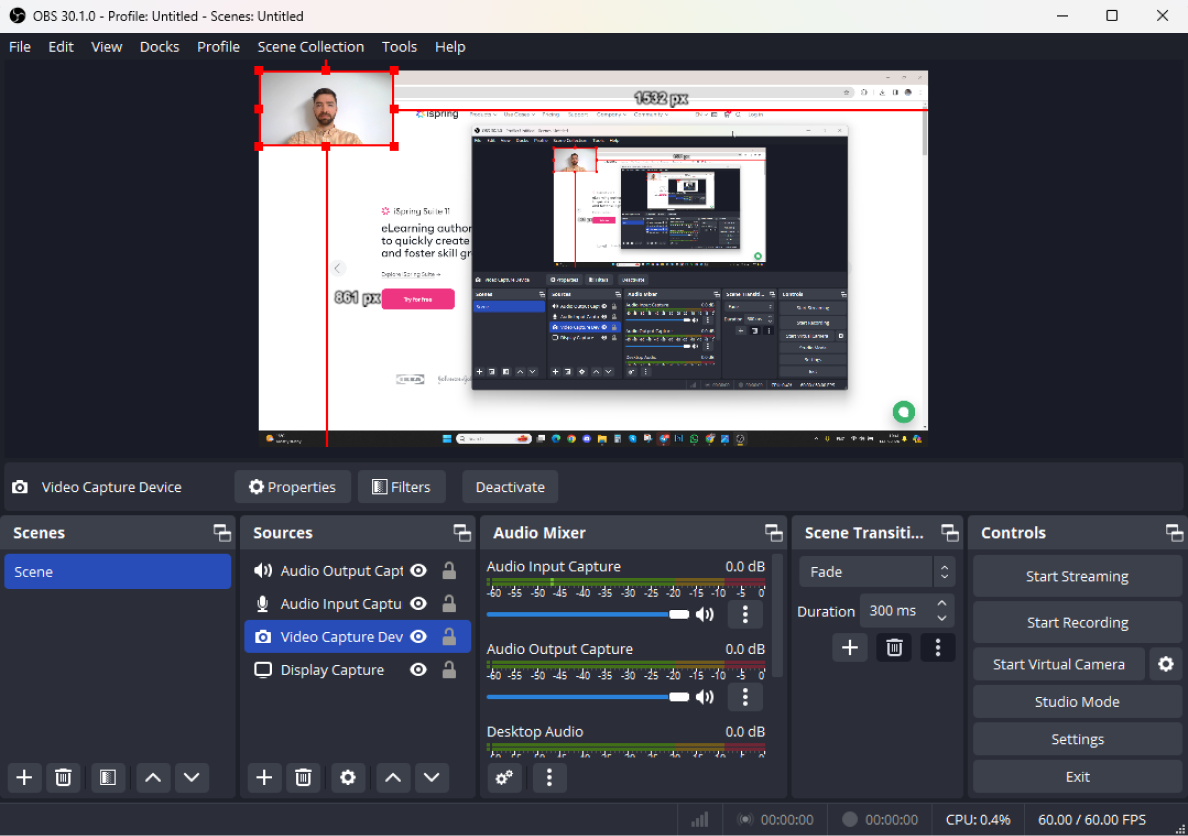
OBS Studio is a popular choice among professionals. It offers high-quality video recording and streaming. Users love its customizable interface. You can easily switch between scenes during live broadcasts. It supports multiple platforms like Windows, Mac, and Linux. OBS Studio is open-source, making it free to use. Its advanced settings allow for precise control over audio and video.
Bandicam
Bandicam is known for its efficient performance. It records high-definition videos with small file sizes. The software is user-friendly, ideal for beginners. Bandicam supports screen capture, game recording, and device recording. It offers real-time drawing features during recording. The software provides options for webcam overlay, adding a personal touch to videos.
Manycam
ManyCam is versatile and interactive. It allows you to add effects and filters to your videos. Users can stream live videos to multiple platforms simultaneously. ManyCam supports picture-in-picture, perfect for presentations. It includes virtual backgrounds, enhancing video professionalism. The software is suitable for teaching, gaming, and business meetings.
Camtasia
Camtasia is renowned for its editing capabilities. It combines recording and editing in one package. Camtasia offers a user-friendly interface with drag-and-drop features. The software provides a wide range of editing tools. You can add transitions, annotations, and voiceovers easily. Camtasia is perfect for creating polished, professional-looking videos. Its tutorials help new users learn quickly.
Comparing Pricing Options
Choosing the best webcam recorder software often depends on your budget and needs. Different software options offer various features at different price points. Exploring these options helps find the right balance between cost and functionality.
Comparing pricing options for webcam recorder software can be overwhelming. Different software offers varied pricing models to suit diverse needs. Understanding these can help you choose the right software without breaking the bank.
Free Software
Free webcam recorders can be a great starting point. They provide basic features without any cost. Users can test functionalities and decide if they need advanced features. These free options often come with limitations. Limited recording time or watermarking can be common restrictions. Free software is perfect for casual use or testing.
Paid Subscriptions
Paid subscriptions offer more features. Users pay a monthly or yearly fee for access. These subscriptions often include updates and customer support. They are ideal for regular users needing advanced features. Subscriptions can add up over time. Consider your budget before committing to a plan.
One-time Purchases
One-time purchases require a single payment. Users gain lifetime access to the software. This option is great for long-term use without recurring costs. It often includes premium features and updates. Evaluate the features before buying. Ensure it meets your recording needs effectively.

Credit: www.descript.com
User Reviews And Ratings
User reviews and ratings often highlight the best webcam recorder software. They provide insights into features, ease of use, and reliability. This feedback helps users make informed choices based on real experiences.
User reviews and ratings can greatly influence software choices. They offer insights into performance, usability, and reliability. Users share experiences, highlighting strengths and weaknesses. Understanding these reviews helps in selecting the right webcam recorder software.
Pros And Cons
User reviews often list pros and cons. This helps identify software strengths and weaknesses. Pros might include easy setup, high-quality recording, and user-friendly interface. Cons could be limited features, occasional bugs, or compatibility issues.
- Pros: Easy setup, high-quality recording, user-friendly interface.
- Cons: Limited features, occasional bugs, compatibility issues.
User Experiences
User experiences provide real-world insights. They reveal how software performs in different scenarios. Users might describe recording quality, ease of use, and customer support. These reviews help assess software effectiveness and reliability. Many users appreciate intuitive interfaces and seamless performance. Some might mention difficulties with advanced settings or integration with other tools. Overall experiences highlight software practicality for everyday use.
Tips For Choosing The Right Software
Selecting the best webcam recorder software involves considering user-friendly interfaces and compatibility with your device. Look for features like high-quality video recording, easy editing tools, and reliable performance. Ensure the software supports your preferred file formats for seamless sharing and storage.
Choosing the right webcam recorder software can be a daunting task. With numerous options available, it’s crucial to know what suits your needs best. A good choice can enhance your recording experience significantly. Let’s explore some essential tips to guide you.
Define Your Needs
Understand what you need from a webcam recorder. Are you recording for professional purposes or personal use? Knowing this helps narrow down choices. Professional use might require advanced features. Personal use might need basic functionality. List out features you need. This could include editing tools, resolution options, or cloud storage. Prioritize these needs to find the right software.
Consider System Requirements
Check the system requirements of the software. Ensure your computer can handle it. Software with high requirements might slow down your system. Look for options compatible with your operating system. Whether it’s Windows, macOS, or Linux. Compatibility ensures smooth performance. Avoid software that demands more than your system can offer.
Trial Versions
Use trial versions to test the software. Many offer free trials for a limited time. This lets you explore features firsthand. Assess user interface and ease of use. Determine if it meets your expectations. A trial period helps in making an informed decision. Choose the software that feels intuitive and serves your purpose best.
Future Trends In Webcam Recording
Exploring future trends in webcam recording reveals exciting software options. Emerging technologies promise enhanced video quality and seamless integration. Choosing the best webcam recorder software involves considering features like user-friendly interfaces, compatibility, and advanced editing capabilities.
The future of webcam recording is becoming increasingly exciting, with technologies evolving to offer enhanced capabilities and seamless integration. As you explore the best webcam recorder software, it’s vital to consider emerging trends that promise to reshape how we capture and share video content. From AI enhancements to immersive virtual reality experiences, these innovations might just change the way you use webcam software.
Ai Enhancements
Artificial Intelligence is transforming webcam recording by adding features that were once only a dream. Imagine a software that automatically adjusts lighting, enhances audio quality, and even edits your video in real-time. AI can personalize your experience, making it easier for you to create professional-looking content without being a tech wizard. Have you ever wondered how AI could predict your needs before you even realize them yourself?
Cloud Integration
Cloud integration is not just about storage; it’s about creating a seamless workflow. Picture your recordings instantly available across all your devices, ready for editing or sharing without delay. This trend in webcam software means you can collaborate with others in real-time, no matter where they are. How could this change your approach to creating content on-the-go?
Virtual Reality
Virtual reality is pushing the boundaries of webcam recording, offering immersive experiences that go beyond traditional video. With VR, you can transport your audience to new worlds, making them feel part of the action. This is not just a novelty; it’s an opportunity to create engaging content that stands out. How might virtual reality redefine your interaction with viewers? As you consider these trends, think about how they align with your needs. Are you ready to embrace the future of webcam recording?
Credit: recorder.easeus.com
Frequently Asked Questions
What Is The Best Webcam Recording Software?
The best webcam recording software includes OBS Studio, ManyCam, and CyberLink YouCam. OBS Studio offers powerful features and is free. ManyCam provides virtual backgrounds and effects, ideal for live streaming. CyberLink YouCam enhances video quality with filters and effects, perfect for professional use.
Choose based on your specific needs.
Does Windows 10 Have A Webcam Recorder?
Windows 10 includes a built-in webcam recorder called Camera app. Access it via the Start menu. Record videos easily. For more advanced features, consider third-party software like OBS Studio or ManyCam. These offer greater flexibility and functionality for webcam recording on Windows 10.
Which Webcam Is Best For Video Recording?
The Logitech C920 is highly recommended for video recording. It offers excellent image quality and reliable performance. Users appreciate its 1080p resolution, built-in stereo microphones, and autofocus features. Its compatibility with various operating systems enhances its appeal. This webcam is a top choice for professionals and content creators alike.
Which Recording Software Is The Best For Pc?
OBS Studio is highly recommended for recording on PC. It offers robust features, is free, and supports streaming.
Conclusion
Choosing the right webcam recorder software depends on your needs. Consider ease of use and features. Good software offers clear video quality. Check for compatibility with your device. Budget-friendly options are available. Read reviews for real user experiences. Test a few before deciding.
Explore free trials if possible. Ensure it meets your recording purposes. Your ideal choice should make recording simple. The right software enhances video projects. Keep your goals in mind while choosing. Aim for software that fits you best. Happy recording!