
Finding the best webcam for your MacBook can improve video calls and online meetings. Good video quality and clear sound matter most for smooth communication.
MacBooks have decent built-in cameras, but external webcams offer sharper images and better audio. They work well for Zoom, Microsoft Teams, and FaceTime. This guide covers top webcams like Logitech C920x Pro HD, Logitech MX Brio Ultra HD 4K, and EMEET models.
These webcams provide clear video, noise reduction, and easy USB connections. Some include privacy covers and automatic light correction. Whether for work or streaming, the right webcam helps you look professional and feel confident on screen. Choose one that fits your needs and budget to get the best experience with your MacBook.
Logitech C920x Pro Hd Webcam

The Logitech C920x Pro HD Webcam is ideal for professionals, content creators, and remote workers who demand high-quality video streaming and conferencing. If you are someone who frequently participates in video calls, live streams, or records videos for online platforms, this webcam offers the perfect balance of performance and ease of use. Its compact size and excellent image quality make it suitable for both home offices and on-the-go setups.
Pros:
- Provides crystal-clear 1080p HD video for sharp and vibrant visuals
- Equipped with dual microphones for clear and natural stereo audio
- Compact dimensions of 3.7 x 1.7 x 2.8 inches and lightweight design (0.35625 lbs) for portability
- Compatible with most major video conferencing platforms
- Easy plug-and-play setup with USB connectivity
Cons:
- Lacks built-in privacy shutter, requiring separate accessory for lens cover
- No 4K video support, limited to 1080p resolution
- May require additional lighting for optimal image quality in low-light environments
The Logitech C920x Pro HD Webcam delivers impressive video quality thanks to its advanced autofocus and light correction features. Users benefit from sharp, detailed images even in less-than-ideal lighting conditions, making it perfect for professional video calls or content creation. The dual microphones enhance the audio experience by capturing clear sound from multiple directions, ensuring your voice is heard crisply and naturally.
Its compact and lightweight form factor means it fits neatly on any monitor or laptop, without adding bulk to your workspace. The webcam’s compatibility with various operating systems and popular video chat applications guarantees a hassle-free setup and seamless integration. Overall, the Logitech C920x offers great value for anyone looking to upgrade their video communication experience with reliable and high-quality hardware.
Logitech Mx Brio Ultra Hd 4k Collaborazione E Streaming Webcam

The Logitech MX Brio Ultra HD 4K Webcam is ideal for professionals and content creators who demand the highest video quality for collaboration and streaming. Whether you are frequently attending Microsoft Teams or Zoom meetings, or producing live streams and video content, this webcam offers advanced features tailored for clear and sharp communication. It is perfect for users who require smooth video at 1080p 60 FPS and superior audio quality for an immersive experience.
Pros:
- Ultra HD 4K resolution for crystal-clear video quality
- High frame rate of 1080p at 60 FPS ensures smooth motion
- Dual microphones with noise reduction for clear audio
- USB-C connectivity for fast and reliable connection
- Privacy shutter included to cover the webcam when not in use
- Compatible with popular platforms like Microsoft Teams and Zoom
- Show Mode feature enhances user presentation on video calls
Cons:
- Higher price point compared to standard webcams
- Requires USB-C port or adapter for connectivity
- May offer more features than casual users need
The Logitech MX Brio Ultra HD 4K Webcam boasts an impressive video resolution that supports ultra-high definition 4K streaming, perfect for users who want to deliver professional-grade visuals. Its ability to capture video at 1080p 60 FPS means you get fluid, jitter-free video, which is essential for both live streaming and professional meetings. The dual microphones equipped with advanced noise reduction technology ensure that your voice comes through clearly, minimizing background distractions and enhancing communication quality.
Designed with convenience in mind, the webcam’s USB-C interface provides a fast and stable connection, reducing setup time and technical issues. The inclusion of a privacy shutter offers peace of mind by allowing users to physically cover the lens when the camera is not in use, protecting privacy. Compatibility with popular collaboration tools like Microsoft Teams and Zoom ensures seamless integration into your existing workflow, while the Show Mode feature adds a dynamic touch to presentations by optimizing your on-camera appearance. Overall, this webcam elevates the quality and professionalism of your video interactions.
Emeet Webcam 1080p C960

The EMEET Webcam 1080P con microfono is an ideal choice for professionals, content creators, and remote workers who require high-quality video and audio for online meetings, streaming, and video calls. If you are looking for a reliable, easy-to-use webcam with clear visuals and excellent sound capture, this webcam is designed to meet your needs.
Pros:
- Full HD 1080P resolution for sharp and clear video quality
- Dual microphones for enhanced audio clarity and noise reduction
- 90° Field of View (FOV) captures a wide area, perfect for conference calls
- USB plug & play setup, no additional drivers required
- Compatible with popular platforms like Zoom, Skype, FaceTime, and YouTube
- Compact and lightweight design (nero color), easy to carry and install
Cons:
- Fixed focus lens may not perform as well in low light environments
- No built-in privacy shutter for lens protection
- Limited customization options for video settings
The EMEET Webcam C960 delivers impressive 1080P video quality that ensures your image appears crisp and professional during online calls and live streams. The inclusion of two microphones improves audio pickup by reducing background noise, which is vital for clear communication in virtual meetings. Its 90° field of view allows you to fit more people or background into the frame without the need to reposition the camera frequently.
Designed for convenience, this webcam features USB plug & play connectivity, making setup quick and hassle-free. Whether you are using Zoom, Skype, FaceTime, or streaming on YouTube, it offers broad compatibility with popular communication platforms. The compact size and sleek black design make it a versatile accessory for any workspace, whether at home or in the office, providing a balance of performance and portability.
Webcam Logitech Brio Ultra Hd
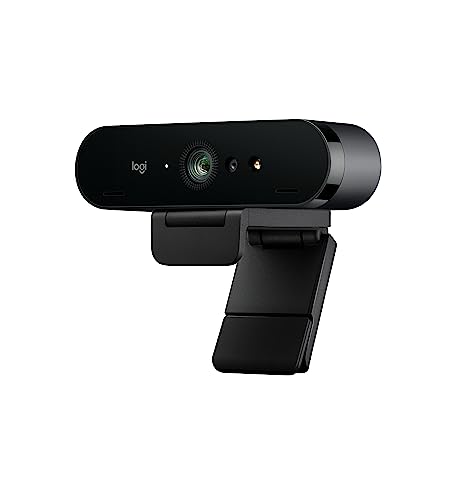
The Webcam Logitech BRIO Ultra HD is perfect for professionals, content creators, and remote workers who demand high-quality video for videoconferences, recording, and streaming. If you need crystal-clear visuals and reliable performance in a sleek, compact design, this webcam is an ideal choice.
Pros:
- Exceptional 4K Ultra HD resolution for sharp and detailed video quality
- High dynamic range (HDR) support ensures balanced lighting in various environments
- Compact and lightweight design with a sleek black finish fits easily on any monitor or laptop
- Advanced autofocus and light correction technology for clear visuals even in low light
- Wide compatibility with popular videoconferencing platforms and streaming software
Cons:
- Premium price point may be a consideration for budget-conscious buyers
- Requires USB 3.0 for full 4K functionality, which may limit compatibility with older devices
The Logitech BRIO Ultra HD Webcam offers unparalleled video clarity thanks to its 4K resolution and HDR capabilities, making it a standout device for anyone serious about professional video quality. Its advanced autofocus and light correction features ensure that users look their best regardless of the lighting conditions, enhancing communication and presentation during calls or streams.
Designed with convenience in mind, the webcam’s compact size and elegant black color enable seamless integration into any workspace setup. Weighing just 0.74 pounds with dimensions tailored for easy mounting, it provides flexibility without sacrificing performance. Whether you are attending important meetings, creating content, or streaming live, this webcam delivers consistent, high-definition video to elevate your digital presence.
Logitech C270

The Logitech C270 720p webcam is ideal for individuals seeking a reliable and affordable video conferencing solution. Whether you’re a remote worker, student, or casual streamer, this webcam offers a straightforward setup with clear video quality, making it perfect for everyday video calls and online meetings.
Pros:
- Delivers clear 720p HD video resolution for sharp and smooth video calls.
- Easy to install and use with USB 2.0 connectivity, compatible with most computers.
- Compact and lightweight design with a convenient clip mount for easy attachment to laptops and monitors.
- Brand reliability from Logitech ensures consistent performance and durability.
Cons:
- Limited to 3 MP image quality, which may not satisfy professional streaming needs.
- No built-in microphone noise cancellation, affecting audio clarity in noisy environments.
- Fixed 720p resolution without higher definition options for advanced users.
The Logitech C270 webcam features a 1280 x 720 pixel resolution that provides high-definition video capture, suitable for clear communication during virtual meetings or online classes. Its plug-and-play USB 2.0 interface allows for quick setup without complicated software installations, making it accessible for users of all technical levels. The compact black design is both stylish and functional, easily clipping onto various devices for flexible placement.
Beyond its video capabilities, the webcam offers consistent performance with Logitech’s trusted quality standards. Its lightweight build ensures portability, while the straightforward controls enhance user experience. Although it lacks some advanced features found in higher-end models, the C270 provides excellent value for users who need a dependable webcam for everyday use without breaking the bank.
Emeet Nova

The EMEET NOVA Webcam 4K is ideal for professionals, content creators, and remote workers who demand high-quality video and audio performance for their online meetings, streaming, or recording. If you need a reliable, plug-and-play webcam with advanced features like ultra 4K HD resolution, autofocus PDAF, and noise-canceling microphones, this webcam is designed to elevate your video conferencing and content production experience.
Pros:
- Ultra 4K HD resolution for crystal-clear video quality.
- Autofocus PDAF ensures sharp and clear images automatically.
- Dual noise-canceling microphones deliver clear sound by reducing background noise.
- 73° field of view (FOV) captures a wide and natural perspective.
- Automatic light correction adjusts to different lighting conditions for optimal video clarity.
- Plug & play USB setup makes installation fast and hassle-free.
- Privacy cover protects your privacy when the webcam is not in use.
Cons:
- The 73° FOV might be narrow for users who want a wider angle.
- At 0.29 pounds, it is relatively lightweight but may require a stable mounting surface.
- Some users might prefer more extensive software customization options.
The EMEET NOVA Webcam 4K features an impressive 4K ultra HD resolution that produces sharp, vivid images, making it perfect for professional presentations and streaming. Thanks to the autofocus PDAF technology, users can enjoy consistently clear video without manual adjustments, enhancing the overall user experience during live calls or recordings. The dual microphones with noise cancellation ensure your voice is heard clearly, minimizing disruptions from surrounding noise.
Additionally, the webcam’s automatic light correction intelligently adapts to different lighting environments, ensuring your video remains bright and natural-looking even in dim or overly bright rooms. The plug & play USB interface allows for quick and easy setup without requiring complex software installations, making it accessible to users of all technical levels. The built-in privacy cover adds an extra layer of security, giving peace of mind when the webcam is not in use.
Logitech Brio 301

La Logitech Brio 301 è ideale per professionisti, insegnanti e chiunque partecipi regolarmente a riunioni online o videoconferenze. Se cerchi una webcam Full HD che offra privacy, qualità video eccellente e un audio chiaro grazie al microfono con riduzione del rumore, questo prodotto fa al caso tuo.
Pros:
- Otturatore per la privacy integrato
- Microfono con riduzione del rumore per audio nitido
- Connessione USB-C per una trasmissione dati veloce e stabile
- Certificata per le principali piattaforme: Zoom, Microsoft Teams, Google Meet
- Correzione automatica della luce per immagini sempre nitide
- Design compatto e colore nero elegante
Cons:
- Prezzo leggermente superiore rispetto a webcam base
- Dimensioni compatte potrebbero influire sulla stabilità senza supporti aggiuntivi
La Logitech Brio 301 si distingue per la sua risoluzione Full HD che garantisce video nitidi e dettagliati, essenziali per presentazioni professionali e lezioni online di alta qualità. L’otturatore per la privacy integrato offre un ulteriore livello di sicurezza, permettendo di coprire la lente quando la webcam non è in uso, eliminando qualsiasi preoccupazione riguardo la privacy personale.
Il microfono con riduzione del rumore è progettato per filtrare i suoni ambientali indesiderati, assicurando che la voce dell’utente sia chiara e comprensibile. Inoltre, la connessione USB-C assicura una facile compatibilità con i dispositivi moderni e una trasmissione dati efficiente. La certificazione per Zoom, Microsoft Teams e Google Meet garantisce la massima compatibilità con le piattaforme di videoconferenza più diffuse, semplificando l’installazione e l’uso quotidiano.
Frequently Asked Questions
What Is The Best Webcam For Macbook In 2023?
The Logitech C920x Pro HD Webcam is a top choice for Macbook users. It offers excellent video quality, ease of use, and reliable performance. With its full HD resolution and dual microphones, it ensures clear communication during video calls and streaming.
Does Logitech Brio Support 4k Streaming?
Yes, the Logitech MX Brio Ultra HD Webcam supports 4K streaming. It offers high-definition video quality, perfect for professional video conferencing and streaming. The webcam also includes features like noise-reducing microphones and a privacy shutter, enhancing both functionality and security.
Is Emeet C960 Plug And Play?
Yes, the EMEET Webcam 1080P C960 is plug and play. It easily connects via USB without needing additional software. This makes it convenient for quick setup during online meetings or video calls, offering a user-friendly experience.
How Does The Logitech C270 Perform For Video Calls?
The Logitech C270 offers solid performance for video calls. With 720p resolution and a built-in microphone, it delivers clear video and audio. This makes it suitable for casual video conferencing and online communication on platforms like Zoom and Skype.
Are There Webcams With Noise Cancellation?
Yes, several webcams, like the Logitech Brio 301, include noise cancellation. They feature built-in microphones that reduce background noise for clearer audio. This is ideal for professional settings, ensuring communication remains crisp and clear during video calls.
Conclusion
Choosing the best webcam for your MacBook depends on your needs and budget. The Logitech C920x offers clear 1080p video and good sound quality. For ultra-high resolution, the Logitech MX Brio or EMEET NOVA provide 4K video and noise reduction microphones.
If you want something simple and affordable, the Logitech C270 delivers decent video for everyday calls. The EMEET Webcam 1080P and Logitech Brio 301 also work well for meetings and streaming. All these webcams are easy to use with MacBook and popular apps like Zoom and Microsoft Teams.
Remember to pick a webcam with good video quality, clear sound, and privacy features. This will improve your video calls and online meetings. Take your time to compare them, so you find the perfect fit for your MacBook setup. Your next video call will be clearer and more professional with the right webcam.