
Are you holding a smartwatch in your hand, wondering how to unlock its full potential? You’re not alone.
These sleek devices promise to make life easier, but only if you know how to use them. Imagine having a personal assistant on your wrist, ready to streamline your day. That’s the magic of a smartwatch. In this guide, you’ll discover simple steps to master your smartwatch, turning it into an indispensable tool.
Whether you want to track your fitness, manage calls, or just stay organized, we’ve got you covered. Get ready to transform your everyday experience with just a few taps and swipes. Dive in and see how easy it is to make your smartwatch work for you.
Choosing The Right Smartwatch
Choosing the right smartwatch can make a big difference in how smoothly you navigate your day. It’s not just about style; it’s about finding a device that fits your lifestyle and works seamlessly with your other tech. Think about what you want to achieve with your smartwatch before making a choice.
Compatibility With Devices
Not all smartwatches play well with every phone or tablet. You need to check if the watch is compatible with your device’s operating system—whether it’s iOS, Android, or something else.
For example, an Apple Watch works best with iPhones, while many Samsung Galaxy Watches are optimized for Android phones. Trying to force a mismatch can lead to frustration with limited features or connectivity issues.
Ask yourself: What phone do you use daily? Does the smartwatch support all the apps and notifications you rely on?
Key Features To Consider
Smartwatches come with a range of features, but not all of them are necessary for everyone. Think about what’s most important to you—fitness tracking, GPS, music control, or contactless payments.
If you’re an athlete, look for heart rate monitoring, workout tracking, and water resistance. If you want convenience, features like voice assistants and quick reply messages can save time.
Write down your must-haves and nice-to-haves. This helps you avoid paying extra for features you won’t use.
Budget And Brand Options
Smartwatches range from affordable to premium prices. Set a budget that fits your finances but also meets your needs.
Brands like Fitbit offer budget-friendly options with solid fitness tracking. On the other hand, Apple and Garmin provide high-end models with advanced features and premium build quality.
Consider warranties and customer support too. Sometimes spending a bit more upfront saves headaches later.
Setting Up Your Smartwatch
Setting up your smartwatch correctly is the key to getting the most out of it. A smooth setup means your device will respond exactly how you want, keeping you connected without interruptions. Let’s walk through the essentials to get your smartwatch ready for daily use.
Initial Pairing Process
The first step is pairing your smartwatch with your smartphone. Usually, the watch will prompt you to download the companion app—this app is crucial for managing settings and syncing data.
Once installed, open the app and follow the on-screen instructions to connect the devices via Bluetooth. Make sure your phone’s Bluetooth is turned on and that both devices are close to each other.
Sometimes, you’ll need to enter a code shown on your watch into the app to confirm the connection. Have you ever missed a step here and wondered why your notifications didn’t show up? This pairing stage is often the culprit.
Customizing Watch Faces
After pairing, personalize your watch face to match your style or needs. Most smartwatches offer a variety of watch faces, from minimalistic designs to ones packed with information like weather, fitness stats, or calendar events.
Within the companion app or directly on the watch, browse through the options and select a face that fits your daily routine. You can often customize colors, widgets, and complications—small info boxes that show data like battery life or steps taken.
Changing your watch face isn’t just about looks; it can improve how quickly you access important information. What information do you check most often during your day? Tailor your watch to bring that front and center.
Configuring Notifications
Notifications keep you updated without constantly checking your phone. However, too many alerts can be overwhelming and drain your battery fast.
Decide which notifications are essential—calls, texts, calendar events, or app alerts—and configure these through the smartwatch settings or companion app. You can usually toggle alerts on or off and choose how they appear, such as vibration, sound, or visual pop-ups.
Think about your daily habits: do you need every social media alert, or just the most important messages? Fine-tuning this will help you stay informed without distractions.
Navigating The Interface
Navigating the interface of a smartwatch is simple once you understand its basic controls. The design combines touch and physical buttons to help you move around easily. Each smartwatch model may vary, but the core concepts stay the same. This section breaks down how to use the touchscreen, access menus, and manage widgets for a smooth experience.
Using Touch And Buttons
The touchscreen responds to taps, swipes, and long presses. Tap to select items or open apps. Swipe up, down, left, or right to scroll through notifications, menus, or screens. Long press on the home screen to customize watch faces or settings.
Physical buttons add convenience. A single press might take you to the home screen. Holding a button can launch voice assistants or power options. Use buttons to go back or open specific features quickly.
Accessing Menus And Apps
To open the main menu, swipe up or press the designated button. This menu shows all installed apps and key settings. Scroll through apps by swiping or using buttons. Tap an app icon to open it.
Some smartwatches use a grid layout for apps, while others list them vertically. Familiarize yourself with your watch’s layout for faster navigation. Return to the home screen anytime by pressing the home button or swiping from the edge.
Managing Widgets And Shortcuts
Widgets display important info like weather, heart rate, or calendar events on your watch face. Swipe left or right on the home screen to cycle through widgets. Customize widgets to show the data you want most.
Shortcuts let you access features quickly. Add shortcuts by long pressing the home screen or using the settings menu. Organize shortcuts for easy reach. Remove or replace shortcuts to keep your watch interface tidy and useful.
Mastering Health And Fitness Tracking
Health and fitness tracking is a key feature of most smartwatches. It helps you stay active and understand your body better. Using your smartwatch for these tasks is simple and effective. It motivates you to keep moving and improve your habits.
Tracking Workouts And Activities
Your smartwatch can track many types of workouts. Walking, running, cycling, and swimming are common examples. Start an activity on the watch, and it records time, distance, and calories burned. Some watches also count your steps throughout the day.
Use the activity app to see your progress. Review your daily, weekly, or monthly stats. This data helps you stay on track with your fitness goals.
Monitoring Heart Rate And Sleep
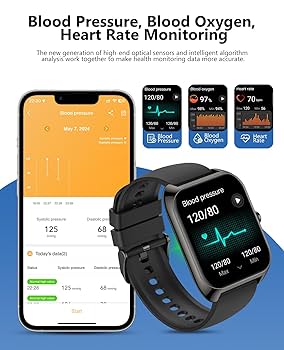
Most smartwatches measure your heart rate automatically. It shows your heart rate during rest and exercise. This helps you know how hard your body is working. You can spot unusual changes and adjust your activity.
Sleep tracking is another important feature. The watch tracks your sleep stages and duration. Use this info to improve your sleep habits. Better sleep means better health and energy.
Using Gps And Fitness Goals
GPS on your smartwatch maps your outdoor activities. Running or cycling routes appear on your phone or watch screen. This feature helps you explore new places safely.
Set fitness goals like steps, distance, or active minutes. Your watch sends reminders and celebrates achievements. This keeps you motivated and focused on your health journey.
Managing Calls And Messages
Managing calls and messages on your smartwatch can save you time and keep you connected without reaching for your phone. These devices are designed to make communication seamless, whether you’re on the move or busy with other tasks.
Making And Receiving Calls
Your smartwatch allows you to answer or make calls directly from your wrist, which is perfect during workouts or when your hands are full. When a call comes in, simply tap the screen or press a button to answer.
To make a call, use the contacts app or dial a number using the keypad if your watch supports it. Some smartwatches even sync with your phone’s call history, so you can quickly call recent contacts.
Replying To Texts And Emails
Quick responses are easy with your smartwatch. You can choose from preset replies or type out a message using an on-screen keyboard or handwriting recognition.
Many watches support email notifications too, letting you read and reply to emails on the go. This feature keeps you updated without pulling out your phone every time a new message arrives.
Using Voice Commands
Voice commands are a game-changer when you need to send messages or make calls hands-free. Just say a simple phrase like “Call Mom” or “Reply to John” and your watch will handle it.
Beyond calls and texts, voice control can open apps, set reminders, and more, making your smartwatch a true assistant. Have you tried talking to your watch yet? It might surprise you how well it understands.

Credit: www.youtube.com
Exploring Advanced Features
Smartwatches offer more than just timekeeping. They come packed with advanced features that make daily tasks easier and more fun. Exploring these features helps you get the most out of your device. Let’s dive into some key functions that enhance your smartwatch experience.
Mobile Payments And Wallets
Many smartwatches support mobile payments. You can pay for items without cash or cards. Simply add your credit or debit card to the watch’s wallet app. Then, tap your watch on a payment terminal to complete transactions quickly and securely. This feature saves time and keeps your payment details safe.
Music Control And Streaming
Control your music directly from your wrist. Smartwatches allow you to play, pause, skip, or rewind tracks easily. Some models let you stream music without your phone nearby. Connect your watch to wireless headphones and enjoy your favorite songs on the go. This feature is perfect for workouts or travel.
Integrating Smart Home Controls
Smartwatches can connect with smart home devices. You can control lights, thermostats, and security systems with simple commands. Adjust settings or check your home’s status without needing your phone. This integration adds convenience and helps you manage your home efficiently.
Troubleshooting Common Issues
Smartwatches bring convenience but sometimes face small issues. These problems can affect performance and user experience. Troubleshooting helps keep the device running smoothly. The following tips cover common problems and simple fixes. They make using your smartwatch easier and less stressful.
Battery Life Optimization
Battery drains quickly on many smartwatches. Reducing screen brightness saves power. Turn off features like GPS and Wi-Fi when not needed. Use power-saving modes during low battery. Close unused apps running in the background. Check for apps that consume more battery and remove them. Charging regularly prevents deep battery drain and extends lifespan.
Syncing Problems And Fixes
Syncing issues stop data transfer between watch and phone. Ensure Bluetooth is turned on both devices. Keep devices close during sync to avoid interruptions. Restart the watch and phone to refresh connections. Update companion apps to the latest version. Clear cache in the app to fix stubborn syncing errors. Re-pair the devices by removing and reconnecting them.
Resetting And Updating Software
Resetting resolves many software glitches. Use the watch’s settings menu to find reset options. Choose factory reset only if other fixes fail. Keep data backed up before resetting. Software updates improve performance and fix bugs. Check regularly for updates in the watch’s settings. Install updates while connected to Wi-Fi and charging. Updates often bring new features and better stability.
Credit: www.amazon.com
Tips For Extending Smartwatch Lifespan
Extending your smartwatch’s lifespan means caring for it every day. Small habits can make a big difference. Follow simple steps to keep your watch working well and looking new for longer.
Proper Charging Habits
Avoid charging your smartwatch overnight. Overcharging can reduce battery life. Unplug the charger when the watch reaches 100%. Use the original charger or a compatible one. Charging too fast or too slow harms the battery. Charge your watch in a cool, dry place. Avoid using it while charging to prevent overheating.
Protecting The Screen And Body
Use a screen protector to prevent scratches. Choose a case or cover to shield the body. Keep the watch away from sharp objects. Avoid dropping or banging the watch. Clean the screen gently with a soft cloth. Avoid exposing the watch to extreme heat or cold. Water resistance is limited; follow the manufacturer’s guidelines.
Regular Maintenance And Care
Clean the smartwatch regularly to remove dirt and sweat. Use a soft, damp cloth and mild soap. Do not use harsh chemicals or abrasive materials. Check the strap for wear and replace if needed. Update the software to improve performance and security. Restart the watch occasionally to keep it running smooth. Store the watch in a safe place when not in use.

Credit: vositone.com
Frequently Asked Questions
What Basic Functions Does A Smartwatch Perform?
A smartwatch tracks fitness, shows notifications, and controls music. It also supports calls, messages, and apps, enhancing daily convenience and health monitoring.
How Do I Connect My Smartwatch To A Smartphone?
Use Bluetooth to pair your smartwatch with your phone. Open the smartwatch app, follow pairing prompts, and allow necessary permissions for sync.
Can Smartwatches Track Health And Fitness Accurately?
Yes, most smartwatches monitor heart rate, steps, and sleep. Accuracy varies but is generally reliable for daily health insights and fitness goals.
How Do I Customize Apps On My Smartwatch?
Access the smartwatch app store or settings menu. Download or enable apps, and arrange them to fit your personal preferences and needs.
Conclusion
Smartwatches help you stay connected and track your health easily. Start by learning basic features and exploring settings step-by-step. Use it daily to get comfortable and discover new functions. Keep your watch charged and updated for best performance. Enjoy how it makes tasks simpler and saves time.
With a little practice, it becomes a helpful tool every day. Give yourself time to explore and use your smartwatch confidently.