
Are you tired of blurry video calls and unflattering angles? Choosing the right webcam can make a world of difference.
Whether you’re working from home, streaming your favorite games, or just catching up with loved ones, the quality of your webcam matters. With so many options out there, finding the best one can be overwhelming. But don’t worry; we’ve got you covered.
This guide will help you discover the top webcams on the market, tailored to your needs and budget. Let’s dive into what makes a webcam truly exceptional and find the perfect match for you. Keep reading to transform your video experience today!
Key Features To Consider
When choosing the best webcam, consider several key features. These features ensure quality, compatibility, and ease of use. A good webcam enhances virtual meetings, streaming, and video calls.
Resolution And Frame Rate
Resolution affects video clarity. Choose at least 1080p for sharp images. A higher frame rate, like 60fps, ensures smooth video playback. This combination offers a better viewing experience.
Field Of View
Field of view determines how much area the camera captures. A wider field of view suits group calls. For personal use, a narrower view might suffice. Choose based on your space and usage needs.
Autofocus And Low Light Performance
Autofocus keeps the image sharp as you move. It’s crucial for dynamic presentations. Low light performance ensures good quality in dim settings. Look for webcams with these features for versatile use.
Compatibility And Connectivity
Ensure the webcam works with your operating system. USB connectivity is common and reliable. Check if the webcam supports your preferred video conferencing apps.
Built-in Microphone Quality
A good microphone captures clear audio. Look for noise-canceling features to reduce background sound. This ensures better communication during calls and recordings.
Top Webcam Brands
In today’s digital age, having a high-quality webcam is essential for everything from virtual meetings to streaming content. With numerous brands offering various features, it’s crucial to know which ones stand out. Let’s dive into some of the top webcam brands that consistently deliver excellent performance and reliability.
Logitech
Logitech has been a trusted name in the webcam industry for years. Known for their durability and crystal-clear image quality, Logitech webcams are perfect for both professional and personal use. Models like the Logitech C920 are popular for their balance of affordability and advanced features like HD video and stereo audio.
Logitech webcams often come with adjustable settings, allowing you to tailor your video experience. Whether you’re hosting a webinar or chatting with family, you can rely on Logitech for a seamless experience.
Razer
Razer, typically known for gaming peripherals, offers webcams that cater to streamers and gamers. The Razer Kiyo, for example, features a built-in ring light, ensuring you have optimal lighting in any environment. This makes it a favorite among those who stream on platforms like Twitch.
Razer webcams are designed with the latest technology to provide high-definition video quality. They are perfect for those who want to engage with their audience in the best possible way.
Microsoft
Microsoft might be synonymous with software, but their webcams are equally impressive. The Microsoft LifeCam series is known for its user-friendly setup and high-quality video output. These webcams are great for business professionals who need reliable hardware for video conferencing.
With advanced features like TrueColor Technology, Microsoft webcams offer vibrant, lifelike video. You can enhance your virtual presence with these well-crafted devices.
Elgato
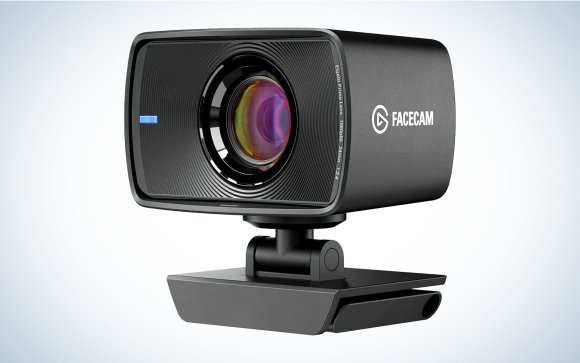
Elgato specializes in products for content creators, and their webcams are no exception. The Elgato Facecam is built for those who need superior video quality with customizable settings. Its uncompressed video output ensures that you get the best image possible.
Elgato webcams are ideal for vloggers and YouTubers who want to deliver top-notch content. If you’re serious about your video quality, Elgato is worth considering.
Anker
Anker is renowned for its affordable yet high-quality electronics. Their webcams are no different, offering great value for the money. The Anker PowerConf C300, for instance, provides 1080p HD video and AI-powered framing.
These webcams are a smart choice for those on a budget who still want excellent performance. Anker’s commitment to innovation and affordability makes their webcams a solid option.
Choosing the right webcam can greatly enhance your digital interactions. Each of these brands offers unique features tailored to different needs. Which brand resonates with you and why?
Best Webcams For Video Conferencing
In today’s fast-paced world, effective communication is key, and video conferencing has become an integral part of our daily lives. Whether you’re working from home or connecting with family and friends, having a reliable webcam can make all the difference in ensuring clear and professional video calls. But with so many options available, how do you choose the best webcam for video conferencing?
High-resolution Options
Picture this: you’re in a crucial meeting, and your video quality is crystal clear, impressing everyone on the call. High-resolution webcams are perfect for those who want to maintain a professional image. Look for webcams offering 1080p or even 4K resolution. These models ensure that every detail is captured, providing a sharper image and making you look your best.
For example, the Logitech Brio is a favorite among professionals, offering 4K resolution and advanced features like RightLight 3 with HDR. This means better lighting adjustments, so you look good even in dim settings. Investing in a high-resolution webcam can significantly enhance your video conferencing experience.
Budget-friendly Picks
If you’re on a budget, don’t worry. You don’t have to break the bank to get a decent webcam for video conferencing. There are several affordable options that still deliver excellent performance. The Logitech C920 is a popular choice, known for its affordability and reliable 1080p video quality.
Another option is the Microsoft LifeCam HD-3000, which offers 720p resolution and is perfect for everyday video calls. These budget-friendly webcams are proof that you can still achieve good quality video without spending a fortune. So, why not give them a try?
Webcams With Privacy Features
Privacy matters, especially when you’re working from home or in a shared space. Webcams with built-in privacy features help protect you from unwanted eyes. Some models come with a physical shutter that you can slide over the lens when not in use, giving you peace of mind.
The Logitech StreamCam is an excellent option with a privacy cover, ensuring your camera is off when you want it to be. You might also consider the Razer Kiyo, which offers a ring light for better illumination and a privacy shutter. In a world where privacy is paramount, these webcams provide the security you need.
What’s your top priority when choosing a webcam for video conferencing? High resolution, affordability, or privacy? Whatever it is, there’s a webcam out there that meets your needs.
Credit: www.popsci.com
Top Choices For Streamers
Exploring top webcams can enhance your streaming quality. Popular models offer clear video, reliable performance, and easy setup. Ideal choices often include features like HD resolution, autofocus, and built-in microphones.
For streamers, choosing the right webcam is crucial. High-quality video can make a stream more engaging. Streamers need webcams that enhance their online presence. Whether new or experienced, finding the best webcam is essential for success.Webcams With Streaming Features
Many webcams offer streaming features that enhance video quality. They come with built-in microphones and noise reduction. Some offer auto-focus and light correction. These features ensure clear and crisp visuals. Popular models include Logitech StreamCam and Razer Kiyo. Both are favorites among streamers for their user-friendly features.High-performance Models
High-performance webcams are ideal for serious streamers. They offer superior video resolution and frame rates. The Logitech Brio and Elgato Facecam are top choices. These models provide 4K video and HDR support. They ensure smooth streaming without lag. High-performance webcams often include advanced customization options. They allow streamers to tweak settings for the best output.Best For Multi-platform Streaming
Streamers often broadcast on multiple platforms. Webcams compatible with different services are crucial. The Logitech C922 and AVerMedia Live Streamer Cam 513 are versatile. They work seamlessly with Twitch, YouTube, and Facebook Live. These webcams offer easy setup and integration. Streamers can switch platforms without hassle. Their compatibility ensures a consistent streaming experience across channels.Webcams For Content Creators
Choosing the right webcam is crucial for content creators. Quality video can elevate your content and engage viewers. Let’s explore key features in webcams that cater to creators’ needs.
4k And High-definition Options
High-definition webcams offer clear and crisp visuals. 4K webcams provide even more detail. They are perfect for professional-looking content. With higher resolution, you capture every nuance. It’s ideal for tutorials and streaming.
Wide Angle Lenses
Wide-angle lenses offer more field of view. They capture more of your surroundings. This is helpful in group settings or wide shots. You can frame more of your background. No need to adjust your position constantly.
Advanced Customization Features
Customization features enhance video quality. Adjust brightness, contrast, and focus. Tailor the image to your preferences. Some webcams offer software for advanced settings. This gives you control over your video output.

Credit: www.ign.com
Portable And Compact Options
Choosing the right webcam can make a big difference. Portable and compact webcams are ideal for those who travel often or need a webcam that fits into tight spaces. They offer convenience without sacrificing quality, making them perfect for various uses.
Travel-friendly Designs
Travel-friendly webcams are designed for easy portability. They are lightweight and often come with protective cases. This ensures they are safe during transit. Some models even have foldable designs to save space in your bag.
Compact Cameras With High Performance
Compact webcams can deliver impressive performance. Despite their small size, many offer HD video quality and clear audio. These cameras often include features like auto-focus and low-light correction. This provides a high-quality experience without bulk.
Flexible Mounting Solutions
Flexible mounting options add to the versatility of portable webcams. They can be attached to laptops, monitors, and tripods. Some models have adjustable clips or magnetic bases. This allows for easy positioning and stability on various surfaces.
Webcam Security And Privacy
Webcams have become a staple in modern communication. People use them for work, school, and social interactions. With increased usage, security and privacy concerns arise. It is vital to protect your webcam from unauthorized access. These measures ensure your online safety and safeguard your personal space.
Built-in Privacy Shutters
Many webcams feature built-in privacy shutters. These physical covers block the camera lens when not in use. They are easy to slide open and closed. Privacy shutters offer immediate protection from prying eyes. They provide peace of mind with a simple, effective solution. Users can ensure their camera is off without needing software.
Secure Software Features
Webcams often come with secure software features. These include encryption and password protection. Such features prevent unauthorized access to your webcam. Software updates ensure ongoing security enhancements. Always enable these features for additional protection. They help keep your device and data safe from cyber threats.
Best Practices For Webcam Security
Adopt best practices for webcam security. Cover your webcam when not in use with a physical cover. Regularly update your webcam software and drivers. Use strong, unique passwords for your devices. Be cautious when granting app permissions to access your webcam. Always verify software sources before installation. These practices help maintain your privacy and security.

Credit: www.engadget.com
Frequently Asked Questions
What Webcam Makes You Look Best?
The Logitech Brio 4K webcam offers high resolution and excellent low-light performance, enhancing your appearance in video calls. Its advanced features like HDR and autofocus ensure clear, vibrant visuals, making you look your best. Invest in proper lighting and a tidy background for optimal results.
Is 4k Better Than 1080p For Webcam?
Yes, 4K webcams offer better image quality and clarity compared to 1080p. They capture more detail, enhancing video calls and streaming experiences. With superior resolution, 4K webcams provide sharper images, ideal for professional use. Ensure compatibility with your device before choosing a 4K webcam for optimal performance.
What Webcam Do Most Streamers Use?
Streamers often use the Logitech C920 webcam. It offers HD video quality and is budget-friendly. Many prefer it for its reliability and ease of use. Other popular options include the Logitech Brio and Razer Kiyo. Each provides excellent streaming capabilities, enhancing viewer experience.
Which Is The Best Company For Webcam?
Logitech is renowned for producing high-quality webcams. Their products offer excellent video quality and reliability. Popular models like the Logitech C920 provide clear visuals and are user-friendly. Ideal for both professional and personal use, Logitech webcams are highly rated and widely recommended by users and tech experts alike.
Conclusion
Choosing the right webcam matters. Quality impacts video calls and streaming. Consider your needs before buying. Think about resolution and features. Popular brands offer reliable options. Logitech and Razer are well-known choices. They provide good value and performance. Compare prices and reviews online.
Check compatibility with your devices. Look for easy installation and use. Remember, investing in a good webcam enhances your experience. Explore various models, read user feedback. Make an informed decision. Your choice should match your usage and budget. Find a webcam that meets your expectations.
Enjoy clearer and smoother video communication.