
Have you ever experienced neck pain or eye strain after long hours at your computer? It might not just be the hours you spend working but the height of your monitor causing discomfort.
Finding the right height for your computer monitor can transform your daily work routine, making your environment not only more comfortable but also more productive. Imagine sitting down at your desk and feeling completely at ease, allowing you to focus solely on your tasks.
We’ll uncover the ideal height for your computer monitor and how it can enhance your work experience. Are you ready to say goodbye to discomfort and hello to a more efficient you? Let’s dive in.

Credit: www.progressivedesk.com
Ergonomics Of Monitor Placement
Proper monitor placement is vital for a comfortable workspace. It enhances productivity and reduces strain. Ergonomics focuses on designing workspaces that fit human needs. This includes the height and position of your computer monitor. A correctly placed monitor can prevent discomfort and long-term health issues.
Importance Of Ergonomic Design
Ergonomic design supports your body’s natural posture. It decreases the risk of muscle strain and fatigue. A well-placed monitor helps maintain a neutral neck position. This is crucial for reducing neck and back pain. Ergonomic settings can also improve focus and efficiency. It creates a more pleasant and health-conscious work environment.
Effects Of Poor Monitor Position
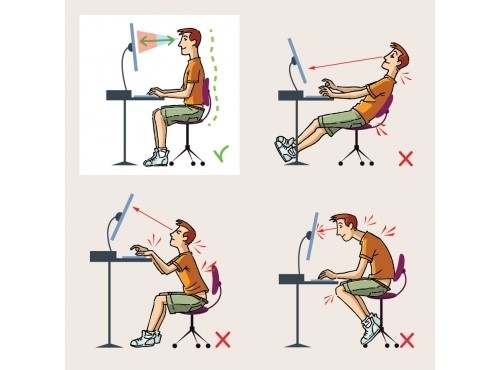
Poor monitor positioning leads to various health problems. It can cause eye strain, headaches, and neck pain. Incorrect height may force you to tilt your head. This results in muscle tension and discomfort. Long-term misalignment can lead to serious spinal issues. Adjusting your monitor to the right height is essential for your well-being.
Credit: www.gvsu.edu
Ideal Monitor Height
Positioning a monitor at eye level is crucial for comfort. The top of the screen should align with your eyes. This reduces neck strain and promotes a healthy posture during long hours of computer use.
Finding the ideal height for your computer monitor can significantly impact your comfort and productivity. Have you ever experienced neck strain after a long day at your desk? The culprit might just be the height of your monitor. Let’s explore how to achieve the perfect setup that could save you from discomfort and enhance your workspace efficiency.
Guidelines For Optimal Height
Your monitor should be positioned so that the top of the screen is at or slightly below eye level. This setup keeps your neck in a neutral position, minimizing strain. Imagine sitting up straight with your eyes looking slightly downward at the screen. Your monitor should be about an arm’s length away from you to reduce eye strain. Here’s a quick checklist: – Top of the screen at or slightly below eye level – Screen distance of about 20-30 inches – Center of the screen slightly below your eye line
Adjusting For Different Desk Setups
Not all desks are created equal. You might have a standing desk, a traditional desk, or even a makeshift workspace. Each setup requires slight adjustments to monitor height. For a standing desk, you may need to raise your monitor slightly higher than usual. Ensure it’s still at eye level when you stand comfortably. If your desk is lower, consider using a monitor stand or stack of books to elevate your screen. The goal is to keep your neck relaxed and avoid looking up or down. Think about your current setup. Is it serving you well, or could a simple adjustment make all the difference? Personal experience: When I first started working from home, I used a dining table as my desk. My monitor was too low, causing daily neck pain. A simple adjustment using a monitor riser transformed my work experience. What changes can you make today to enhance your workspace and well-being?
Impact On Health And Productivity
Positioning the computer monitor at eye level can reduce neck strain and enhance productivity. A comfortable viewing angle minimizes eye fatigue and boosts focus. Proper monitor height is crucial for maintaining good posture, leading to better health and efficient work performance.
When setting up your workstation, the height of your computer monitor plays a crucial role in your health and productivity. A well-positioned monitor can reduce health risks and boost productivity, yet it’s often overlooked. Are you unknowingly straining your eyes or slouching due to improper monitor placement?
Reducing Eye Strain
If your monitor is too high or too low, your eyes will suffer. Constantly adjusting your gaze leads to eye strain. You might notice headaches or blurred vision after long hours. Position your monitor so your eyes are level with the top of the screen. This simple adjustment helps keep your eyes relaxed. Adjusting the monitor height can be as effective as upgrading your hardware. Don’t forget about lighting. Poor lighting can worsen eye strain. Ensure your workspace is well-lit and free from glare.
Improving Posture
A poorly positioned monitor can wreak havoc on your posture. Slouching or craning your neck are common responses to an improperly placed screen. Such habits can lead to neck and back pain. Sit up straight and ensure your monitor is at eye level. Your neck should be comfortable, not strained. This adjustment encourages a neutral spine position, reducing discomfort. Remember, your body tells you when something’s wrong. If you’re feeling sore, it might be time to reassess your monitor height. Improving monitor height is a quick win for your health and productivity. Adjust your setup and feel the difference in your daily routine. Are you ready to make this change for your well-being?
Tools For Adjusting Monitor Height
Finding the right height for your computer monitor is crucial for your posture and overall comfort. Fortunately, there are various tools available to help you adjust your monitor to the perfect height. Whether you’re working from home or in an office, having the proper setup can make a significant difference in your daily productivity and physical health. Let’s dive into some practical tools that can help you achieve the ideal monitor height.
Types Of Monitor Stands
Monitor stands come in many shapes and sizes, offering a simple solution to elevate your screen. You might find adjustable stands that allow you to change the height and angle. These are particularly useful if you often switch between sitting and standing.
Consider a stand with built-in storage; it can declutter your desk while lifting your monitor to eye level. A colleague once told me about how adding a stand with a drawer not only helped her posture but also kept her desk organized.
There are also risers designed specifically for dual monitors. If you use more than one screen, such a stand can ensure both monitors are at the same height, preventing neck strain.
Using Adjustable Desks
Adjustable desks are a game-changer for those seeking flexibility in their workspace. These desks can be raised or lowered effortlessly, allowing you to maintain the perfect eye level with your monitor whether sitting or standing.
Imagine the freedom of working at a desk that moves with you. My friend, who constantly switches from sitting to standing, swears by her adjustable desk for its ease of use and its role in her back pain relief.
But what if you’re not ready to invest in a new desk? There are desk converters available that can fit onto your existing desk, offering a more affordable way to enjoy the benefits of an adjustable workspace.
Have you ever considered how a simple change in monitor height could impact your work efficiency and comfort? Exploring these tools could be the start of a more ergonomic and pleasant work environment.
Tips For A Comfortable Workspace
Creating a comfortable workspace is essential for productivity and well-being. A well-organized desk setup can reduce strain and fatigue. It helps maintain focus and efficiency during long hours at the computer. This guide will explore key tips for arranging your workspace effectively.
Lighting And Screen Position
Proper lighting reduces eye strain. Place your monitor away from direct sunlight. This prevents glare on the screen. A desk lamp with adjustable brightness is ideal. Position the monitor at eye level. The top of the screen should align with your eyes. This setup helps maintain a natural neck position.
Keyboard And Chair Alignment
Keyboard placement affects wrist comfort. Keep it at elbow height. Your elbows should form a 90-degree angle. Ensure wrists remain straight while typing. Choose a chair that supports your lower back. Adjust the chair height so feet rest flat on the ground. A footrest can provide extra support if needed.
Common Mistakes To Avoid
Positioning your computer monitor correctly is crucial for comfort. Many users make common mistakes that affect their health. Understanding these mistakes can help improve your workspace. Avoiding them can enhance your productivity and well-being.
Overlooking Personal Comfort
Personal comfort is often ignored in monitor setup. People focus on aesthetics, not comfort. This can lead to discomfort and strain. Always prioritize your comfort over looks. Ensure the monitor height suits your eye level. This prevents neck pain and enhances focus.
Ignoring Physical Symptoms
Physical symptoms should never be ignored. Eye strain and headaches are warning signs. They indicate your monitor is at the wrong height. Adjust the monitor if you feel discomfort. Your body knows what it needs. Listening to it can prevent long-term issues.

Credit: theofficeoasis.com
Frequently Asked Questions
What Is The Best Height For A Monitor Screen?
The optimal monitor height aligns the top of the screen with your eye level. This ensures comfortable viewing and reduces neck strain. Adjust your chair and monitor setup for ergonomic benefits, keeping the screen at arm’s length distance. Proper height enhances productivity and supports better posture.
What Is The Best Height For A 27 Inch Monitor?
The best height for a 27-inch monitor aligns the top of the screen with your eye level. This reduces neck strain and enhances comfort. Maintain a distance of about 20-30 inches from your eyes for optimal viewing. Adjust the monitor to minimize glare and ensure ergonomic alignment.
What Is The Best Height For A Monitor For Neck Pain?
Position the monitor so the top is at or slightly below eye level. This reduces neck strain. Keep the screen about an arm’s length away to avoid discomfort.
What Is The Ideal Height For A Monitor?
The ideal height for a monitor is eye-level. Your eyes should align with the top third of the screen. This setup reduces neck strain and improves posture. Adjust your chair height and screen tilt to achieve this position for optimal ergonomic comfort.
Conclusion
Setting the right monitor height is vital for comfort. It helps reduce neck strain. A good position boosts productivity and focus. Eyes should align with the top of the screen. Sitting posture matters too. Keep your back straight and feet flat.
Adjust monitor height to fit your eyes. Try different setups for the best result. Comfort leads to better work habits. Explore options and find what suits you. Remember, small changes make a big difference. Prioritize your health and workspace efficiency.
Your monitor setup impacts daily performance. Aim for a balance between comfort and functionality.