
Imagine transforming your living space with just your voice. How cool would it be to simply tell your home to dim the lights or change their color without lifting a finger?
If you’re curious about which LED lights can seamlessly integrate with Google Home, you’re in the right place. These LED lights not only add a touch of modernity to your home but also bring convenience and efficiency into your daily life.
As you read on, you’ll discover the top LED lights compatible with Google Home, making your smart home experience smooth and hassle-free. Get ready to unlock a world where technology meets comfort and style, tailored just for you.
Compatibility With Google Home
Choosing LED lights that work with Google Home enhances your smart home experience. Compatibility ensures seamless control over your lighting using voice commands. With Google Home integration, you can turn lights on or off, adjust brightness, or change colors. This setup offers convenience and energy efficiency. Let’s explore which LED lights are compatible with Google Home.
Philips Hue
Philips Hue is a popular choice for smart lighting. These bulbs connect easily with Google Home. You can control them using simple voice commands. Philips Hue offers a wide range of bulbs, including white and color options.
Tp-link Kasa Smart
TP-Link Kasa Smart bulbs are another excellent option. They work well with Google Home. These bulbs do not require a hub. Simply connect them to your Wi-Fi network. Control brightness and set schedules with ease.
Le Smart Led Bulbs
LE Smart LED bulbs provide great value. They are compatible with Google Home. These bulbs offer color-changing features. Adjust colors to suit your mood. Enjoy the flexibility of voice-controlled lighting.
Lifx Smart Bulbs
LIFX smart bulbs are known for their vibrant colors. They integrate seamlessly with Google Home. No hub is needed for these bulbs. Control them directly via Wi-Fi. LIFX offers a variety of bulb shapes and sizes.
Sengled Smart Led
Sengled Smart LED bulbs are easy to use. They work well with Google Home. These bulbs require a hub for connectivity. Once connected, they offer reliable performance. Enjoy voice-activated lighting in your home.
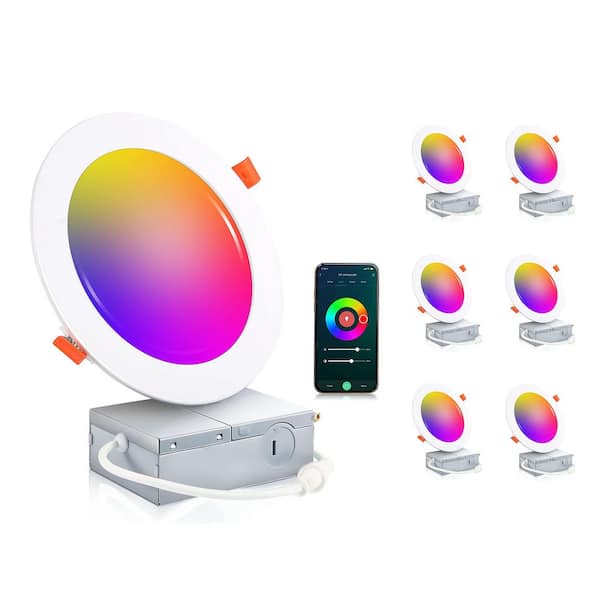
Credit: www.homedepot.com
Top Led Brands
Choosing the right LED lights for your Google Home setup can transform your living space into a smart haven. The top LED brands offer compatibility, ease of use, and innovative features that make controlling your lights a breeze. Whether you’re looking for vibrant colors or energy efficiency, these brands have something to offer. So, which ones should you consider?
Philips Hue
Philips Hue is a pioneer in smart lighting technology, offering a wide range of options that seamlessly integrate with Google Home. You can set schedules, change colors, and even sync lights with music for a dynamic experience. Philips Hue bulbs are known for their reliability and ease of use. Have you ever wanted your home to greet you with the perfect mood lighting? Philips Hue makes it possible.
Lifx
LIFX provides brilliant light quality and a wide color spectrum, making it a favorite for those who love experimenting with ambiance. These bulbs connect directly to Wi-Fi, eliminating the need for a hub, which simplifies setup. Imagine controlling your lights from anywhere in your home with just your voice. LIFX makes that dream a reality, enhancing your lighting experience with vibrant colors.
Sengled
Sengled offers affordable smart lighting solutions that integrate smoothly with Google Home. Their bulbs are known for their energy efficiency and durability, perfect for those conscious of their carbon footprint. Wondering how to start your smart home journey without breaking the bank? Sengled provides a reliable entry point with innovative features like motion detection and adjustable brightness.
Wyze
Wyze is a budget-friendly brand that doesn’t compromise on features. Their smart bulbs are user-friendly and offer compatibility with Google Home, making them ideal for newcomers to smart lighting. Have you ever thought smart lighting was too complex or expensive? Wyze challenges that notion, offering straightforward options that enhance your home automation experience.
Smart Features
Explore LED lights compatible with Google Home for seamless smart home control. Brands like Philips Hue and LIFX offer easy integration. Enjoy voice-activated lighting for convenience and energy efficiency.
Smart LED lights compatible with Google Home offer many features. These features make your home lighting flexible and fun. With smart features, you can control lights with your voice, set schedules, and adjust colors and brightness.
Voice Control
Use your voice to control smart LED lights. This feature works well with Google Home. Simply say commands like “Turn off the lights” or “Dim the lights.” It’s convenient and hands-free. You can control one light or all lights in a room. Voice control makes daily tasks easier.
Scheduling And Automation
Scheduling lets you set times for lights to turn on or off. Automate lights to match your routine. Wake up to soft lights in the morning. Set them to turn off when you leave home. Automation helps save energy. It also adds security by making it look like someone is home.
Color And Brightness Adjustments
Change the mood with color and brightness settings. Select from a wide range of colors. Adjust brightness for the perfect ambiance. Brighten up a room for reading. Dim the lights for a cozy evening. Color and brightness options offer flexibility for any occasion.
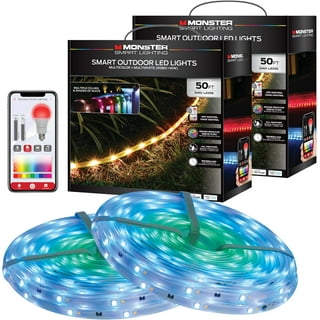
Credit: www.walmart.com
Energy Efficiency
Energy efficiency is a major consideration when choosing LED lights compatible with Google Home. Not only do these smart bulbs offer convenience and control, but they also help you save on electricity bills. With Google Home integration, your lighting system can become smarter, adjusting to your lifestyle and optimizing energy use.
How Smart Led Lights Conserve Energy
Smart LED lights are designed to use less power while providing the same brightness as traditional bulbs. They are equipped with advanced technology that allows you to dim or brighten the lights remotely, reducing unnecessary energy consumption. You can also set schedules and routines through Google Home, ensuring lights are off when not in use.
Benefits Of Energy-efficient Led Lights
Switching to energy-efficient LED lights can result in significant savings on your electricity bill. These bulbs have a longer lifespan compared to incandescent bulbs, meaning fewer replacements and less waste. Additionally, they produce less heat, reducing cooling costs during warmer months.
Choosing The Right Led Lights For Your Home
When selecting LED lights compatible with Google Home, look for bulbs labeled as ‘energy-efficient’ or ‘smart’. Brands like Philips Hue and LIFX offer options that work seamlessly with Google Home and provide excellent energy savings. Consider your home’s lighting needs and choose bulbs that match your desired brightness and color temperature.
Making The Most Of Energy Efficiency Features
Maximize the energy efficiency of your smart LED lights by utilizing Google Home’s features. Set up routines to automatically turn off lights when you leave home or go to bed. Use voice commands to control brightness levels, ensuring you only use the amount of light you need.
Why Energy Efficiency Matters
Have you ever thought about the impact of your lighting choices on the environment? Energy-efficient LED lights reduce your carbon footprint by using less power and lasting longer. Making a small change in your home can contribute to a larger effort to conserve energy and protect our planet.
Installation And Setup
Installing and setting up LED lights with Google Home is simple. Smart LED lights offer convenience and energy savings. Connecting them to Google Home adds voice control. Follow the steps below for a seamless setup.
Ensure Compatibility
Check if your LED lights are compatible with Google Home. Compatibility ensures smooth functioning and ease of use. Refer to the manufacturer’s guide for confirmation.
Download The Required App
Install the app needed for your LED lights. Most smart lights have a dedicated app. This app helps in the initial setup and configuration. Use the app to connect the lights to your Wi-Fi network.
Connect Lights To Wi-fi
Ensure your lights are within range of your Wi-Fi. Open the app and follow instructions to connect. A stable Wi-Fi connection is crucial for uninterrupted operation.
Set Up Google Home
Open the Google Home app on your device. Make sure your device is connected to the same Wi-Fi network. Tap on the ‘+’ icon to add a new device. Select the option to set up a new device.
Link Smart Lights
In the Google Home app, choose your smart light brand. Follow the on-screen instructions to link your account. This step links your lights with Google Home for voice control.
Test Voice Commands
Once linked, test basic voice commands. Try commands like “Turn on the lights” or “Dim the lights”. Ensure Google Home responds correctly and the lights react as expected.
Troubleshoot Common Issues
If issues arise, check your Wi-Fi connection. Ensure your Google Home app is updated. Restarting the app or device can solve minor glitches.

Credit: www.amazon.com
Price Range And Budget Options
Choosing the right LED lights compatible with Google Home depends on your budget. Prices vary widely, making it important to consider your spending limit. Some options are budget-friendly, while others may offer advanced features at a higher cost. Understanding the price range helps you make an informed choice.
Low-cost Led Options
Affordable LED lights can still work with Google Home. Basic models start around $10 per bulb. They offer essential features like voice control and scheduling. These are suitable for simple lighting needs. You can find them online or at local stores.
Mid-range Choices
Mid-range LEDs offer more features at a reasonable price. These lights range from $20 to $40 per bulb. They often include color-changing capabilities and improved app controls. This range provides a balance between cost and functionality.
High-end Led Lights
Premium LED lights provide advanced options and superior quality. Prices start at $50 per bulb and can go higher. They offer features like energy efficiency and extensive color palettes. These are ideal for those seeking top-notch smart lighting experiences.
Considerations For Smart Lighting
When selecting LEDs, think about your needs and space. Consider if you need color-changing lights or simple white ones. Check if the bulbs fit existing fixtures. Research compatibility with other smart devices at home.
User Reviews And Feedback
In the quest to find the perfect LED lights compatible with Google Home, user reviews and feedback can be incredibly insightful. These firsthand accounts provide a glimpse into real-world experiences, showcasing the pros and cons of various products. As you delve into these reviews, you’ll uncover valuable insights that can guide your purchasing decisions.
What Users Love About Compatibility
Many users appreciate the seamless integration between Google Home and certain LED lights. This compatibility allows for voice-controlled lighting changes, enhancing convenience and efficiency. Imagine adjusting your bedroom lighting without ever lifting a finger—it’s a reality for many Google Home users. User feedback often highlights how quick and responsive these lights are, making the interaction smooth and satisfying.
Ease Of Setup
Setting up LED lights with Google Home is a breeze for most users. Positive reviews frequently mention how straightforward the installation process is, even for those who aren’t tech-savvy. A simple connection to your Wi-Fi and a few taps on your smartphone can have your lights responding to voice commands in no time. This user-friendly setup is a major selling point for many.
Common Issues And Troubleshooting
While the overall feedback is positive, some users encounter challenges. Connectivity issues, though rare, can be frustrating. A few reviews highlight problems with lights not responding or disconnecting from the network. However, many users find simple solutions, such as resetting the device or checking Wi-Fi settings. Reading these reviews can prepare you for potential hiccups and offer ways to overcome them.
Variety And Customization Options
Users rave about the customization options available with Google Home-compatible LED lights. From adjusting brightness to changing colors, the possibilities are endless. Reviews often mention how these features enhance ambiance and allow for personalized settings. Whether you’re hosting a party or winding down for the evening, the ability to tailor your lighting to your mood is a significant advantage.
Energy Efficiency And Cost Savings
Energy efficiency is another factor that resonates well with users. LED lights are known for their low energy consumption, and integrating them with Google Home can optimize this even further. Users often share experiences of noticeable reductions in electricity bills. This eco-friendly aspect is not just beneficial for your wallet but also for the planet.
User reviews and feedback offer a wealth of information that can help you choose the right LED lights for your Google Home. What features matter most to you? Consider exploring these reviews to find products that align with your needs and preferences.
Future Of Smart Lighting
Smart lighting is evolving with LED lights that integrate seamlessly with Google Home. These LEDs allow easy voice control, enhancing home automation. Compatibility with Google Home ensures effortless management of brightness and color, bringing convenience and efficiency into everyday living spaces.
The future of smart lighting is bright and innovative. With advancements in technology, smart lighting systems offer more than just illumination. They enhance the ambiance, save energy, and provide convenience. Google Home integration adds another layer of functionality. You can control lights with voice commands or through your smartphone. This seamless integration makes smart lighting a vital part of modern homes. Smart lights that work with Google Home offer easy setup. They connect through Wi-Fi or Bluetooth. Many brands offer Google Home-compatible options. Popular choices include Philips Hue and Lifx. These lights sync effortlessly with Google Home. Smart LED lights are energy-efficient. They consume less power compared to traditional bulbs. With dimming options, you can save more energy. Google Home allows you to schedule lighting. This feature cuts down on unnecessary energy use.
Customization Features
Smart lighting offers personalization features. Adjust brightness or change colors with ease. Google Home lets you set scenes for different moods. You can create a cozy atmosphere or a lively party vibe. Custom settings enhance your home environment.
Voice Control Benefits
Voice control simplifies light management. No need to reach for switches or remotes. Just say, “Hey Google, turn on the lights.” It’s convenient, especially when hands are full. Voice commands make smart lighting accessible and user-friendly.
Integration With Other Smart Devices
Smart lights can work with other devices. Google Home connects with thermostats, security cameras, and more. Integrated systems create a cohesive smart home. Lights can react to security alerts or temperature changes. This interaction enhances safety and comfort.
Frequently Asked Questions
Do You Need Special Lights For Google Home?
You don’t need special lights for Google Home. Compatible smart bulbs enhance functionality, but regular lights work too. Ensure bulbs support Google Assistant for seamless integration. Popular options include Philips Hue and LIFX. Check compatibility before purchasing.
What Is Compatible With Google Home?
Google Home is compatible with smart lights, thermostats, security systems, speakers, TVs, and streaming devices. It works with brands like Philips Hue, Nest, Samsung SmartThings, and Chromecast. Users can control devices through voice commands, making home automation seamless and efficient.
How Do I Connect My Led Lights To Google?
To connect LED lights to Google, install a compatible smart light app. Link your lights in the app. Open Google Home, tap “+” and select “Set up device. ” Choose your light’s brand and follow prompts to complete setup. Ensure lights are connected to Wi-Fi for seamless integration with Google Assistant.
Is Philips Hue Compatible With Google Home?
Yes, Philips Hue is compatible with Google Home. You can control Philips Hue lights using voice commands through Google Assistant. Simply connect Philips Hue to the Google Home app to start managing your lights seamlessly. Enjoy features like dimming, color changes, and scheduling with ease.
Conclusion
Choosing LED lights compatible with Google Home is easy. Explore top brands like Philips Hue and Lifx. These brands offer seamless integration. You can control lights with voice commands. This enhances home convenience and efficiency. Smart lighting creates a cozy atmosphere.
It also allows remote control from anywhere. Consider the features you need. Different LEDs offer various benefits. Always check compatibility before purchasing. Enjoy smart lighting and modern living. Make your home a tech-savvy space. Your choice impacts comfort and style.
Smart lighting simplifies daily routines. Embrace the future of home automation.