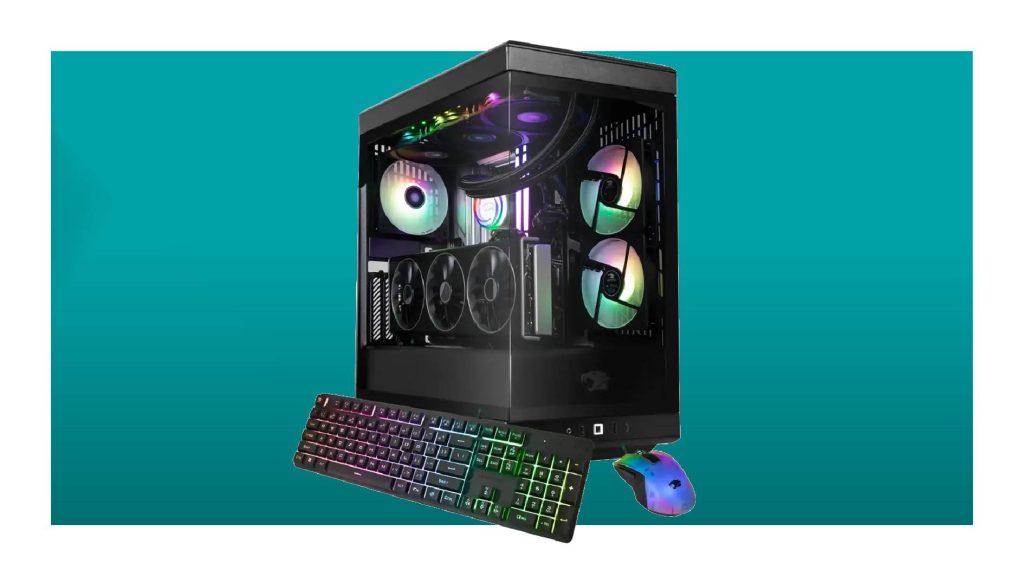
Imagine sitting down to play your favorite game. You power up your PC, and everything just flows seamlessly—the graphics are stunning, and there’s zero lag.
Sounds like a dream, right? This is the magic of a good gaming PC setup. But what exactly makes a gaming PC setup “good”? And how can you create one that suits your needs without breaking the bank? In this guide, you’ll discover the essential components that transform a regular PC into a gaming powerhouse.
Whether you’re a seasoned gamer or just starting out, understanding these elements will help you enhance your gaming experience. You’ll learn about the best hardware choices, how to ensure smooth gameplay, and tips to optimize your setup for the ultimate immersion. Dive in and let your gaming adventures begin!
Choosing The Right Pc Components
Selecting the right components is crucial for building a good gaming PC setup. Focus on a powerful graphics card, sufficient RAM, and a reliable processor to ensure smooth gaming performance. Consider storage options like SSDs for faster load times.
Choosing the right PC components can make or break your gaming experience. It’s like assembling a well-tuned orchestra where each instrument plays a crucial role in the harmony of performance. Whether you’re aiming to run the latest AAA games at ultra settings or seeking seamless VR adventures, the components you select will define your gaming rig’s capabilities and longevity.
Processor Options
Your processor, or CPU, is the brain of your gaming PC. The choice often boils down to AMD or Intel. AMD’s Ryzen series offers excellent multi-threading capabilities, ideal for gaming and streaming simultaneously. On the other hand, Intel’s Core processors are known for their single-core performance, which can be advantageous for games that rely on fewer cores. Consider what games you play and how you use your PC to decide which processor suits you best.
Graphics Card Selection
A powerful graphics card is essential for high-quality visuals. NVIDIA and AMD are the main players here, offering a range of GPUs to fit various budgets. If you’re aiming for 4K gaming or VR, a high-end card like the NVIDIA RTX 3080 or AMD Radeon RX 6800 XT is worth the investment. Ensure your chosen card is compatible with your monitor’s resolution and refresh rate to get the best experience.
Ram Requirements
RAM, or memory, is crucial for multitasking and game performance. 16GB is the sweet spot for most gamers, providing enough headroom for gaming and background applications. However, if you plan on heavy multitasking or future-proofing your system, 32GB might be worth considering. Check the speed and type of RAM your motherboard supports to avoid compatibility issues.
Storage Solutions
Fast storage reduces load times and enhances overall system responsiveness. An SSD (Solid State Drive) for your operating system and games is a must. NVMe SSDs offer even faster speeds compared to SATA SSDs. For additional storage, a traditional HDD (Hard Disk Drive) can be used for less frequently accessed files. Balancing speed and capacity based on your needs is key.
Motherboard Compatibility
Your motherboard is the backbone of your gaming PC, connecting all components together. Ensure it supports your chosen CPU and RAM type. Look for features like PCIe slots for future upgrades, USB ports, and network connectivity that meet your needs. Don’t forget to check the form factor to ensure it fits in your case.
Power Supply Considerations
A reliable power supply unit (PSU) ensures stable power delivery to your components. Calculate your system’s power consumption and opt for a PSU that provides a little extra headroom. A modular PSU can help with cable management, keeping your build neat and improving airflow. Look for a PSU with an 80 Plus efficiency rating for better energy efficiency and longevity. Building a gaming PC is like crafting a personal masterpiece. Each choice reflects your gaming style and needs. Are you ready to create your ultimate gaming setup?

Credit: www.ign.com
Optimal Peripherals For Gaming
When building a gaming PC setup, peripherals can significantly enhance your gaming experience. These are not mere accessories; they are the tools that connect you to the virtual world. From vibrant visuals to precise controls, having the right peripherals can be the difference between a good setup and a great one.
Monitor Specifications
A monitor is not just a screen; it’s your window to the gaming universe. Look for a monitor with a high refresh rate, ideally 144Hz or more, to ensure smooth gameplay. Resolution matters too—go for at least 1080p, but 4K is the dream for stunning visuals. Consider IPS panels for better color accuracy and viewing angles. Have you ever played a game where the vibrant colors bring every scene to life? That’s the magic of a quality monitor.
Keyboard And Mouse Features
Your keyboard and mouse are your direct interface with the game. Mechanical keyboards are favored for their tactile feedback and durability. Choose a keyboard with customizable RGB lighting to match your gaming vibe. When it comes to mice, look for high DPI settings for precision and customizable buttons for ease. Imagine having your ultimate gaming combo, where every click and key press feels intuitive and responsive.
Headset And Audio Equipment
Audio plays a crucial role in immersion. A good headset should provide clear sound and comfortable wear for long sessions. Look for models with surround sound capabilities to catch every in-game detail. Noise-cancelling microphones are essential for clear communication. Have you ever been so engrossed in a game that the world outside disappears? That’s the power of quality audio gear.
Game Controllers And Accessories
Not all games are suited for keyboard and mouse; some feel just right with a controller. Choose a controller with ergonomic design and responsive buttons. Accessories like charging docks and thumb grips enhance usability and comfort. Ever tried playing a racing game without a controller? It’s a whole different experience, and often not for the better.
Investing in optimal peripherals transforms your gaming setup from standard to spectacular. What upgrades will you make to level up your gaming experience?
Setting Up The Gaming Environment
Choosing a good gaming PC setup involves balancing performance and budget. Focus on a powerful graphics card, sufficient RAM, and a fast processor to enhance gameplay. A comfortable chair and ergonomic desk complete the ideal gaming environment.
Setting up the perfect gaming environment can significantly enhance your gaming experience. Imagine diving into a virtual world where everything from your seating to your lighting is optimized for comfort and focus. Achieving this requires attention to detail and a little creativity. Whether you’re a casual player or a dedicated gamer, creating a space that suits your needs can make all the difference. Let’s explore the essentials of setting up a gaming environment that’s both functional and inviting.
Desk And Chair Ergonomics
Your desk and chair are the foundation of your gaming setup. Investing in an ergonomic chair can prevent back pain during those extended gaming sessions. Look for chairs with adjustable height and lumbar support. The desk should offer ample space for your monitor, keyboard, and mouse. A clutter-free desk helps maintain focus. Consider a desk with cable management features to keep wires organized.
Lighting And Ambiance
Lighting can set the mood for your gaming environment. Adjustable LED lights can enhance the ambiance and reduce eye strain. Opt for a mix of task lighting and ambient lighting. Think about the color of your lights. Cooler tones can keep you alert, while warmer tones can create a relaxing atmosphere. Experiment to find what works best for you.
Cable Management Tips
Tangled cables can be frustrating and unsightly. Use cable ties or clips to keep your wires organized and out of sight. A tidy setup not only looks better but also prevents accidental disconnections. Label your cables for easy identification. This can be a lifesaver when troubleshooting or upgrading your setup.
Cooling And Ventilation
Proper cooling is crucial to prevent overheating during intense gaming sessions. Ensure your PC has sufficient airflow and consider adding extra fans if necessary. Keep your setup away from direct sunlight or heat sources. Regularly clean your equipment to avoid dust buildup that can block ventilation.
Software And System Optimization
Software and system optimization is crucial to ensuring your gaming PC runs smoothly and efficiently. A well-optimized system can significantly improve your gaming experience, reducing lag and increasing frame rates. Let’s explore some essential components of software and system optimization that can elevate your gaming setup.
Operating System Tweaks
Your operating system is the backbone of your PC, and tweaking it can yield significant performance improvements. Disabling unnecessary startup programs can free up valuable resources and speed up your system. Adjusting power settings to high performance can also prevent your PC from throttling down during intense gaming sessions.
Driver Updates
Keeping your drivers updated is like giving your PC regular health check-ups. Graphics card drivers, in particular, are essential for maintaining top performance and compatibility with new game releases. Use manufacturer software like NVIDIA GeForce Experience or AMD Radeon Software to easily manage updates.
Game Performance Settings
Optimizing in-game settings can drastically enhance your gaming experience. Lowering graphics settings like shadows and textures can boost frame rates without a noticeable loss in visual quality. Experiment with different settings to find the perfect balance for your system.
Antivirus And Security
While gaming, the last thing you want is a virus slowing down your system. Choose a lightweight antivirus that won’t hog resources while providing robust protection. Regular scans and updates will keep your PC safe without impacting your gaming performance.
Consider how these optimizations can transform your gaming experience. What tweaks have you found most effective for your setup?
Budgeting And Upgrading Over Time
Choosing a good gaming PC setup involves balancing initial budget with future upgrades. Start with essential components like a strong processor and graphics card. Over time, add more RAM and better storage to enhance performance without overspending initially.
Creating a gaming PC setup that doesn’t break the bank but still delivers an exhilarating gaming experience is a challenge many face. With technology evolving rapidly, it’s crucial to strike a balance between immediate needs and future aspirations. This journey involves smart budgeting and thoughtful upgrading over time, allowing you to enjoy gaming without constant financial strain.
Setting A Budget
The first step to building your gaming setup is setting a clear budget. Determine how much you’re willing to spend upfront, keeping in mind any additional costs like monitors, peripherals, and software. A realistic budget prevents overspending and helps prioritize the most crucial components like the CPU and GPU. Consider what games you want to play and at what settings. Do you need ultra-high graphics, or are medium settings sufficient? This can significantly affect your budget. It’s also wise to allocate a portion of your budget for future upgrades—things like additional RAM or a better cooling system.
Choosing Between Pre-built And Custom
One of the most significant decisions is whether to buy a pre-built system or to build a custom PC. Pre-built systems save time and often come with warranties, offering peace of mind if you’re not tech-savvy. However, they can sometimes be more expensive and less customizable. On the other hand, custom builds allow you to choose each component, often resulting in better performance for the same price. Building your own can be a rewarding experience, giving you complete control over your system. If you’re unsure, consider starting with a pre-built option with the potential to upgrade components later.
Planning For Future Upgrades
Future-proofing your setup is essential in the fast-paced world of gaming technology. Start with a motherboard that supports the latest processors and has enough slots for additional RAM and storage. This gives you flexibility as new parts become available. Keep an eye on new technologies and trends. For example, investing in a power supply with higher wattage than currently needed can save you money when upgrading to more power-hungry components. Regularly monitor your system’s performance and identify bottlenecks to address them with targeted upgrades. Are you ready to embark on the exciting journey of building and evolving your gaming PC setup? Remember, patience and planning are your best allies.

Credit: www.facebook.com
Maintaining And Troubleshooting
A good gaming PC setup involves regular maintenance and quick troubleshooting. Keep components clean and updated for optimal performance. Address issues promptly to prevent long-term damage.
Maintaining a good gaming PC setup is crucial for ensuring your system runs smoothly and efficiently. Regular upkeep and troubleshooting not only extend the lifespan of your hardware but also optimize your gaming experience. Let’s dive into essential tips to keep your gaming rig in top shape.
Regular Cleaning And Maintenance
Dust is your PC’s worst enemy. It can clog fans, reduce airflow, and cause overheating. Regular cleaning is vital to prevent this. Use compressed air to gently blow out dust from fans, vents, and components. A soft brush can help with stubborn particles. Consider setting a schedule for cleaning every few months. This keeps your system running cooler and quieter. A clean PC is a happy PC, after all.
Identifying Common Issues
Sometimes your PC might act up, but don’t panic. Common issues include sudden crashes, freezing, or hardware not being recognized. Check if cables are properly connected, especially after cleaning or moving your setup. Monitor your system temperatures. Overheating can cause performance drops and crashes. Ensure your cooling solutions—fans or liquid cooling—are functioning well. Are your drivers up to date? Outdated drivers can cause compatibility issues.
When To Seek Professional Help
You’ve tried everything, but your PC still misbehaves. This might be the time to seek professional help. If you’re facing persistent hardware failures or complex issues like motherboard problems, it’s wise to consult an expert. Don’t hesitate to reach out for help if you’re uncertain. While DIY troubleshooting is great, professionals can save you time and stress, ensuring your gaming rig is back to its best performance.

Credit: www.ign.com
Frequently Asked Questions
What Is A Recommended Pc For Gaming?
A recommended gaming PC includes an Intel i7 or Ryzen 7 processor, NVIDIA RTX 3060 or Radeon RX 6600 GPU, 16GB RAM, and SSD storage. Ensure a good cooling system for optimal performance. Prioritize a high refresh rate monitor for a smoother gaming experience.
Customize based on your specific gaming needs.
How Much Should A Gaming Pc Setup Cost?
A gaming PC setup typically costs between $800 to $2,500. Budget setups start around $800. Mid-range setups range from $1,200 to $1,800. High-end setups can exceed $2,500. Prices vary based on components and customization. Consider your gaming needs and budget when deciding.
Can A 500 Pound Pc Run Fortnite?
A £500 PC can run Fortnite, but performance depends on hardware specifications. Ensure it meets minimum requirements like a decent GPU and CPU, 8GB RAM, and sufficient storage. Adjust in-game settings for optimal gameplay. Regular updates might affect performance. Consider upgrading components for better experience.
What Is The Best Configuration For A Gaming Pc?
The best gaming PC configuration includes an Intel i9 or AMD Ryzen 9 CPU, NVIDIA RTX 3080 GPU, 32GB RAM, and a 1TB SSD. Ensure a high-refresh-rate monitor, quality cooling system, and a reliable power supply. Customize based on personal preference and budget for optimal performance.
Conclusion
A good gaming PC setup enhances your gaming experience. It combines quality hardware and comfortable ergonomics. Choose a powerful processor for smooth gameplay. Invest in a high-quality graphics card. Ensure ample RAM for multitasking. Prioritize a reliable cooling system. Comfortable seating boosts focus and enjoyment.
Quality peripherals matter too. A responsive mouse and keyboard improve performance. An immersive monitor completes the setup. Balance is key. Consider your budget and needs. Tailor your setup to suit your style. Enjoy gaming with efficiency and comfort. Making thoughtful choices leads to memorable gaming moments.