
Have you ever wondered what makes a gaming PC so powerful? Imagine having a machine that brings your favorite games to life with stunning graphics and lightning-fast performance.
That’s the magic of a well-built gaming PC. But what’s inside that sleek case? Understanding the components of a gaming PC can seem like unraveling a mystery, but it’s easier than you might think. Dive into this guide, and you’ll discover the essential parts that work together to create your ultimate gaming experience.
We’ll break down each component, from the powerful processor to the graphics card that makes every detail pop. You’ll learn how these parts interact to deliver the seamless gaming you crave. Whether you’re a seasoned gamer or just starting out, knowing what’s inside your gaming PC will empower you to make the best choices for your setup. Get ready to unlock the secrets of your gaming powerhouse!
Central Processing Unit
The Central Processing Unit (CPU) is the heart of your gaming PC, dictating how smoothly your games run and how quickly your system responds to commands. Imagine it as the brain that processes all the data necessary to bring your virtual worlds to life. It’s crucial to choose the right CPU to ensure a seamless gaming experience, especially when you’re navigating fast-paced, graphics-intensive games.
Role In Gaming
Your CPU’s role in gaming is vital, as it handles all the calculations and processes that allow your games to run efficiently. While the graphics card gets a lot of attention, the CPU ensures that your game logic, AI, and physics operate smoothly. Have you ever noticed a lag or stutter in your game when lots of actions are happening simultaneously? That’s often due to the CPU struggling to keep up. A powerful CPU minimizes these hiccups, providing a fluid gaming experience.
Choosing a CPU isn’t just about speed; it’s about understanding how it impacts your gaming style. Are you into games that require heavy multitasking or extensive AI computations? Then a faster, multi-core CPU will serve you better. Do you stream while gaming? A CPU with superior processing power can handle both tasks effortlessly.
Popular Models
There are several popular CPU models that gamers swear by, each offering different strengths. The AMD Ryzen series, for instance, is famous for its multitasking capabilities and affordability. It’s a favorite among gamers who need performance without breaking the bank. On the other hand, Intel’s Core i5 and i7 models deliver reliable speed and efficiency, ideal for high-end gaming.
Consider the Intel Core i9 if you’re looking for top-tier performance. This model is celebrated for its exceptional speed and ability to handle intense gaming sessions without overheating. It’s perfect for gamers who demand the best and enjoy playing the latest AAA titles at maximum settings.
Before deciding, think about your gaming needs and budget. Would you prefer a balanced option like the Ryzen 5 or an elite choice like the Core i9? The decision can significantly impact your gaming experience.
What does your current gaming setup look like? Could it benefit from a CPU upgrade?
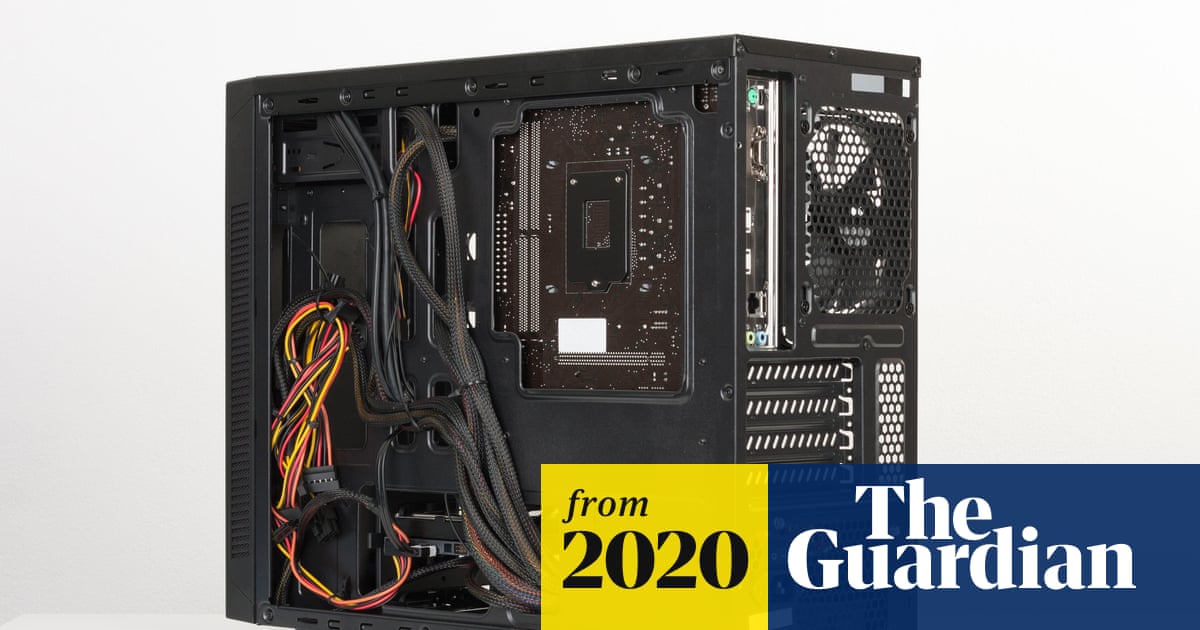
Credit: www.theguardian.com
Graphics Processing Unit
A gaming PC’s heart is the Graphics Processing Unit (GPU). It powers the visuals for immersive gameplay. High-performance GPUs ensure smooth graphics and fast responses, enhancing the gaming experience.
The Graphics Processing Unit, or GPU, is vital in a gaming PC. It handles rendering images, animations, and video for the screen. This component is crucial for gaming performance. A powerful GPU allows for smooth and detailed graphics. Gamers often prioritize a good GPU for an enhanced experience. It determines how well games run and how they look.
Importance For Performance
A GPU affects how fast and smooth games load. It ensures high-quality visual effects. Faster GPUs lead to better frame rates. They allow for more complex scenes and detailed textures. Without a strong GPU, games can lag or stutter. High performance in games relies heavily on the GPU’s capability.
Top Brands
Several brands dominate the GPU market. Nvidia and AMD are popular choices. Nvidia’s GeForce series is known for high performance. AMD’s Radeon series offers strong competition. These brands offer a range of options for different budgets. Their GPUs are often compared for efficiency and power. Choosing between them often depends on user preference and game requirements.
Motherboard
The motherboard is often called the backbone of your gaming PC. It’s the critical component that ties everything together, ensuring seamless communication between your CPU, GPU, RAM, and other parts. Understanding its features can help you make informed decisions when building or upgrading your gaming rig.
Connectivity Options
Modern motherboards come with a plethora of connectivity options to support a wide range of peripherals and components. From USB ports for your mouse and keyboard to HDMI and DisplayPort for your monitor, the options are numerous. Look for boards with USB-C for faster data transfer and future-proofing your setup.
Network connectivity is another vital aspect, with many motherboards now offering built-in Wi-Fi. This feature is especially useful if your PC isn’t near a wired connection. Ethernet ports are still standard, providing faster and more stable internet connections when needed.
Form Factors
The form factor of a motherboard determines its size and compatibility with your PC case. The most common form factors are ATX, Micro-ATX, and Mini-ITX. ATX boards offer the most features and expansion slots, perfect for high-end gaming PCs.
Micro-ATX boards are a bit smaller but still provide a good balance of features and size, ideal for mid-range builds. Mini-ITX is the smallest, often used in compact builds where space is a premium. Choosing the right form factor ensures your motherboard fits snugly into your case and meets your gaming needs.
Have you ever considered how the size of your motherboard could impact your gaming experience? A smaller board might limit future upgrades, while a larger one offers room to grow. Always weigh your current needs against potential future requirements.
Memory (ram)
Memory, often referred to as RAM, is a crucial component of any gaming PC. It acts as the short-term memory of your computer, allowing it to store data temporarily for quick access. Whether you’re diving into a fast-paced game or multitasking between applications, the right amount of RAM can significantly enhance your gaming experience.
Impact On Speed
RAM plays a pivotal role in determining the speed and responsiveness of your gaming PC. More RAM allows your computer to handle more tasks simultaneously without slowing down. Imagine playing a game while streaming on Twitch; sufficient RAM ensures smooth gameplay and seamless streaming.
Lack of enough RAM might result in lag or stuttering, which can be frustrating during intense gaming sessions. Think of RAM as your PC’s ability to think quickly and act fast. With faster RAM, your gaming PC can load levels and render graphics much quicker.
Recommended Capacity
Choosing the right amount of RAM can make or break your gaming experience. For most modern games, 16GB of RAM is considered a sweet spot. This capacity is ample for running games at high settings and keeping background applications open.
If you are a serious gamer or content creator, you might want to consider 32GB. While 32GB may seem excessive for gaming alone, it provides future-proofing and supports demanding software. Before making a decision, ask yourself: What other tasks do I perform alongside gaming?
Also, check the game’s system requirements as they can guide you in selecting the proper RAM size. Remember, more RAM is not always better if it exceeds your needs, so balance is key.
Storage Solutions
Understanding storage solutions in a gaming PC is crucial. It impacts speed and performance. Gamers often choose between Solid State Drives (SSD) and Hard Disk Drives (HDD). Let’s dive into these options and their capacities.
Solid State Drives Vs Hard Disk Drives
SSDs are faster and more reliable. They use flash memory, which makes data access quick. This means faster game load times. HDDs, on the other hand, are slower but cheaper. They use spinning disks to read and write data. For budget setups, HDDs offer more storage at a lower cost.
In modern gaming PCs, many use both. The SSD for the operating system and key games. The HDD for storing larger files and less important data. This combination balances speed with capacity and cost.
Storage Capacity Choices
Storage capacity depends on your needs and budget. SSDs typically range from 128GB to 2TB. Larger capacities are available but expensive. For gaming, a 512GB SSD is a common choice. It holds several large games comfortably.
HDDs offer more space for less money. Common sizes include 1TB to 4TB. They are ideal for storing a vast library of games and media. For a mix of speed and storage, consider a smaller SSD paired with a larger HDD.
Choosing the right storage affects your gaming experience. Consider your needs carefully. Balance performance and capacity within your budget. This ensures a smooth and enjoyable gaming experience.
Power Supply Unit
A gaming PC relies on a power supply unit to convert electricity from the outlet to usable energy. This component ensures all parts of the computer receive stable power, maintaining performance and preventing damage.
The Power Supply Unit, or PSU, is a vital part of a gaming PC. It converts the electricity from your wall outlet into usable power for your computer. It ensures that all components receive a stable and sufficient power supply. Without a reliable PSU, your gaming experience could suffer from sudden shutdowns or hardware damage.
Efficiency Ratings
PSUs come with different efficiency ratings. These ratings indicate how well a PSU converts power without wasting energy. Higher efficiency means less energy loss, which saves you money and reduces heat output. Look for certifications like 80 Plus Bronze, Silver, Gold, Platinum, or Titanium. Each level represents increasing efficiency. Gold and above are ideal for gaming PCs, offering better performance and reliability.
Wattage Requirements
Choosing the right wattage is crucial for your PC’s stability. Calculate the total power your components need, including the CPU, GPU, RAM, and storage devices. Add extra wattage for future upgrades. Most gaming PCs need between 500 to 750 watts. High-end systems may require 1000 watts or more. Ensure your PSU can handle peak loads to avoid system failures.
Cooling Systems
Every gaming PC enthusiast knows the importance of keeping their system cool. It’s not just about performance; it’s about ensuring longevity and stability of your machine. A well-maintained cooling system can make all the difference between a seamless gaming experience and frustrating crashes.
Air Cooling Vs Liquid Cooling
Air cooling is the most common method found in gaming PCs. It uses fans to blow cool air over the internal components. If you’re looking for a straightforward solution, air cooling might be your best bet. It’s generally easier to install and maintain, making it a popular choice for beginners.
Liquid cooling, on the other hand, offers a more efficient heat dissipation. It uses a liquid coolant to absorb heat from the components, which is then moved to a radiator where the heat is expelled. Liquid cooling can be quieter and often more effective, especially if you’re pushing your system with heavy games or overclocking.
But it does come with its own challenges. Installing a liquid cooling system can be more complex, and there’s always the risk of leaks. Are you willing to trade ease for efficiency?
Maintaining Optimal Temperature
Keeping your gaming PC at optimal temperature is crucial. High temperatures can reduce the lifespan of your components and degrade performance. Regular cleaning and dusting can prevent fans from clogging and ensure airflow isn’t restricted.
Consider monitoring your system’s temperature using software tools. These can alert you when temperatures rise unexpectedly, allowing you to address potential issues before they cause harm.
Think about the placement of your PC. Is it tucked away in a corner with limited airflow? Moving it to a more ventilated area can significantly impact cooling efficiency. Little tweaks can lead to substantial improvements.

Credit: www.ign.com
Case And Design
The case of a gaming PC is more than just a box. It houses all the components and ensures their protection. The design affects cooling, noise, and overall performance. It also contributes to the visual appeal of the setup.
Various sizes and styles are available. Each caters to different needs and preferences.
Space For Upgrades
A spacious case allows for easy upgrades. Gamers often upgrade components over time. A roomy design provides flexibility for adding new hardware.
Larger cases usually have more slots for extra drives or GPUs. This is essential for future-proofing your gaming setup.
Aesthetic Considerations
Many gamers value the look of their PC case. Transparent panels showcase the internal components. LED lighting adds a vibrant touch.
Some cases offer customizable RGB lighting. This allows personalization to match your gaming style. The design can reflect your personality.
Choosing a case with unique features can enhance your gaming environment. Aesthetic appeal can create an immersive experience.
Peripherals And Accessories
Explore what’s inside a gaming PC with peripherals and accessories enhancing the experience. Key components include high-performance graphics cards, efficient cooling systems, and ergonomic keyboards. These elements ensure smooth gameplay and immerse users in virtual worlds.
When assembling a gaming PC, peripherals and accessories are crucial components. They transform a simple setup into an immersive gaming experience. These items extend beyond the core components of a PC. They enhance gameplay, comfort, and overall efficiency. Each piece plays a vital role in ensuring a seamless gaming session.
Essential Gaming Gear
Every gaming setup needs essential gear. Keyboards and mice are primary tools. Mechanical keyboards offer precision and durability. Many gamers prefer them for their tactile feedback. Gaming mice provide accuracy and speed. They come with customizable buttons. These buttons allow quick access to game commands. Headsets are important for immersive sound. They enable communication with teammates. A good headset ensures clear audio and a comfortable fit. Monitors also impact gaming. High refresh rates and low response times are key. They ensure smooth visuals without lag.
Customization Options
Customization offers a personal touch to gaming gear. RGB lighting is popular among gamers. It adds vibrant colors to keyboards and mice. Many devices allow lighting adjustments. Gamers can match their setup with their style. Custom keycaps are another option. They enhance the look and feel of keyboards. Different shapes and textures provide a unique experience. Mouse pads also come in various designs. Some feature large surfaces for extra movement. Others have unique textures for improved control. Customizing gear enhances the gaming experience. It allows gamers to create a setup that reflects their personality.

Credit: www.instagram.com
Frequently Asked Questions
What Is Inside A Gaming Pc?
A gaming PC typically includes a powerful CPU, dedicated GPU, RAM, SSD or HDD, motherboard, and cooling system. It also features a case with ample space and connectivity options. High-quality power supply units ensure stable performance, while RGB lighting adds aesthetic appeal.
Is $1000 Dollars A Lot For A Gaming Pc?
$1000 is a reasonable budget for a gaming PC. It allows for decent components, supporting smooth gameplay. Prices vary based on specifications and preferences. Prioritize a good GPU, CPU, and sufficient RAM. Research and compare options to get the best performance for your budget.
What Are The 7 Components Of A Pc?
A PC consists of seven main components: the central processing unit (CPU), motherboard, RAM, storage drive, power supply unit, graphics processing unit (GPU), and cooling system. Each part plays a crucial role in performance and functionality. Ensure compatibility for optimal efficiency and user experience.
What Is Needed For A Gaming Pc?
A gaming PC needs a powerful CPU, a high-performance GPU, sufficient RAM, a solid-state drive, and a reliable power supply. Ensure good cooling and a compatible motherboard for optimal performance. Quality peripherals like a gaming monitor, keyboard, and mouse enhance the experience.
Conclusion
Exploring a gaming PC’s inner components is fascinating. Each part plays a crucial role. From the powerful CPU to the vibrant graphics card. The motherboard connects everything, ensuring smooth gameplay. RAM boosts speed, while storage holds your games. Cooling systems keep temperatures in check.
Power supplies energize the system efficiently. Understanding these components enhances your gaming experience. Now, you’re ready to choose or build your own gaming PC. Dive deeper, learn, and enjoy the process. Happy gaming!