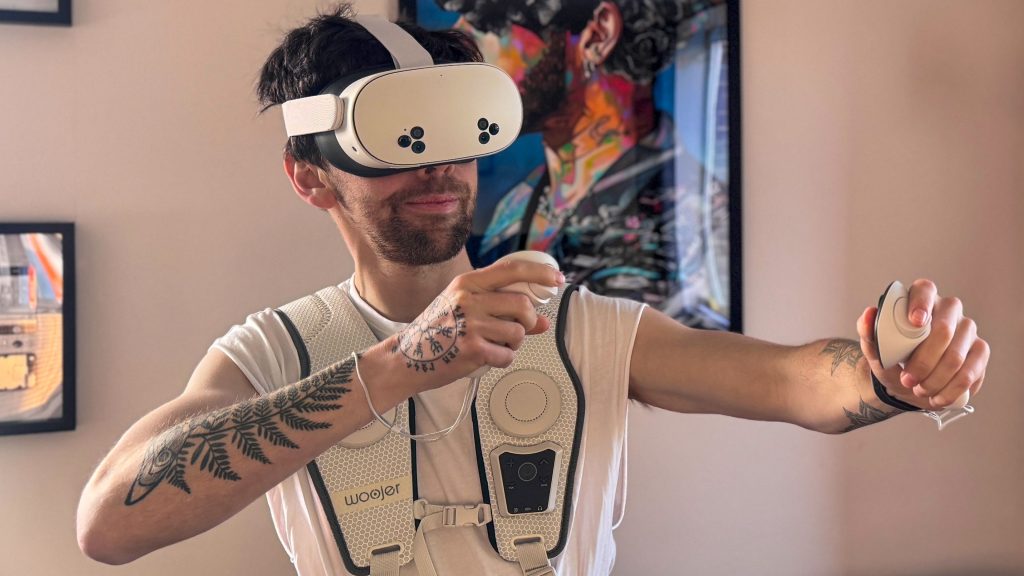
Imagine stepping into a world where boundaries blur, and reality merges seamlessly with imagination. Sounds intriguing, right?
That’s the promise of virtual reality (VR) headsets. But before you dive into this immersive experience, you’re probably wondering, “Is a VR headset worth it for me? ” The allure of exploring new dimensions from the comfort of your home is tempting, but is it truly the game-changer it’s hyped up to be?
We’ll uncover the true value of VR headsets, weighing their benefits against the costs, so you can make an informed decision. Ready to discover if VR is your next big adventure? Let’s dive deeper.
Benefits Of Vr Headsets
VR headsets offer a wide range of benefits that go beyond just entertainment. They create new ways for you to interact with digital content, making experiences feel more real and engaging. Whether you want to play games, learn new skills, travel virtually, or socialize, VR headsets can enhance what you do in meaningful ways.
Immersive Gaming Experience
Playing games with a VR headset is completely different from traditional gaming. You don’t just watch the game; you step inside it. This changes how you react and interact, making gameplay more thrilling and intense.
Imagine dodging attacks by physically moving or picking up objects with your hands. This level of immersion can make your gaming sessions more exciting and memorable.
Enhanced Learning And Training
VR headsets help you learn by doing rather than just reading or watching. They simulate real-world scenarios where you can practice skills safely and repeatedly.
For example, medical students can perform virtual surgeries, and pilots can train in flight simulators. These experiences improve your skills and confidence without the risks of real-life practice.
Virtual Travel And Exploration
If you want to visit places without leaving your home, VR lets you travel virtually. You can walk through famous landmarks or explore natural wonders as if you were there.
This is perfect if you can’t travel often or want to preview a destination before your actual trip. It also opens up opportunities to experience cultures and environments you might never see otherwise.
Social Interaction In Vr
VR headsets connect you with others in shared virtual spaces. You can meet friends, attend events, or join communities from anywhere in the world.
These interactions feel more personal because you can use gestures and voice chat, creating a stronger sense of presence. Have you ever thought about how VR could change the way you stay connected?
Types Of Vr Headsets
Virtual reality headsets come in different types. Each type offers a unique experience. Choosing the right one depends on your needs and budget.
Standalone Vr Headsets
Standalone VR headsets do not need a computer or phone. They have built-in processors and screens. This makes them easy to use and carry. They offer good graphics and smooth performance. Ideal for beginners and casual users.
Pc-powered Vr Headsets
These headsets connect to a powerful PC. They deliver high-quality visuals and complex games. Users need a strong computer to run them well. Best for serious gamers and professionals. They often have better tracking and more features.
Mobile Vr Headsets
Mobile VR headsets use a smartphone as the screen. You just insert your phone into the headset. They are affordable and simple. Graphics and performance depend on the phone’s power. Suitable for light VR use and first-time users.
Console Vr Headsets
Console VR headsets connect to gaming consoles like PlayStation. They provide a good balance of power and ease. Games are designed specifically for these systems. Great for console owners wanting VR experiences. Setup is usually straightforward and user-friendly.
Key Features To Consider
Choosing the right VR headset means looking closely at several key features that impact your overall experience. These factors determine how immersive, comfortable, and functional your virtual adventures will be. Let’s break down the essentials you should keep in mind before making your decision.
Display Quality And Resolution
The display quality directly affects how sharp and clear the virtual world appears. Higher resolution screens reduce the “screen door” effect, where you can see individual pixels, making the experience more realistic. Ask yourself: do you want crisp visuals for detailed games and movies, or is basic clarity enough for casual use?
Brightness and color accuracy also play a role, especially if you plan to watch videos or use VR for design work. My first VR headset had decent resolution but dull colors, which made long sessions less enjoyable. Upgrading to a model with OLED panels made a noticeable difference in immersion.
Field Of View
The field of view (FOV) is how wide your vision feels inside the headset. A larger FOV means you see more of the virtual environment at once, which can make experiences feel more natural and less boxed-in. Most VR headsets range between 90 to 120 degrees, but aiming for at least 100 degrees can boost immersion.
Think about how much peripheral vision matters to you. If you’re into fast-paced games or exploring vast landscapes, a wider FOV helps you spot details without turning your head constantly. On the other hand, a smaller FOV might be fine if you mainly use VR for casual apps or social experiences.
Tracking And Sensors
Accurate tracking is critical for smooth and responsive VR. It controls how well the headset and controllers follow your movements in real-time. Some headsets use external sensors placed around the room, while others rely on built-in cameras or inside-out tracking that doesn’t need extra setup.
Consider your space and setup convenience. I switched from a sensor-heavy system to one with inside-out tracking and found it easier to move around without worrying about losing tracking. Also, check if the headset tracks hand and finger movements for more natural interaction.
Comfort And Ergonomics
You’ll spend hours wearing your VR headset, so comfort is non-negotiable. Look for adjustable head straps, balanced weight distribution, and breathable materials that reduce heat buildup. A headset that feels heavy or pinches your face can quickly ruin even the most exciting VR session.
Try to test the headset if possible, or read reviews focusing on comfort during extended use. My experience showed that even small padding improvements made a huge difference in reducing fatigue. Don’t overlook this if you plan to use VR regularly.
Controller Design And Functionality
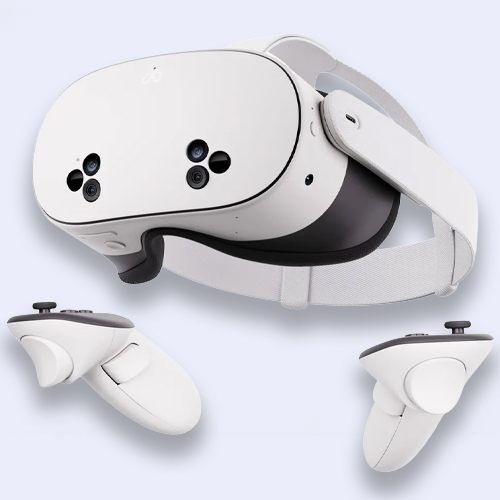
Controllers are your hands in the virtual world, so their design and features affect how natural interactions feel. Good controllers offer precise tracking, ergonomic grips, and buttons that are easy to reach without looking. Some even support advanced gestures or finger tracking for more detailed control.
Think about what types of VR activities you enjoy. If you like fast action games, responsive and comfortable controllers are essential. For creative apps, having multiple input options can enhance your ability to manipulate objects and tools. Your choice here can make or break the VR experience.
Credit: www.tomsguide.com
Popular Vr Headset Brands
Popular VR headset brands shape the virtual reality market. They offer different features, designs, and price points. Choosing the right brand depends on your needs and budget. Here are some well-known VR headset brands to consider.
Oculus (meta)
Oculus, owned by Meta, leads in standalone VR headsets. Their devices offer easy setup and wireless use. Oculus Quest series is popular for its balance of price and performance. It supports a wide range of games and apps. The brand focuses on user comfort and simple controls.
Htc Vive
HTC Vive targets serious VR users and gamers. Their headsets provide high-quality visuals and precise tracking. Vive devices often require a PC connection for full power. They include advanced features for room-scale VR experiences. HTC Vive suits users wanting immersive gameplay and professional use.
Sony Playstation Vr
Sony PlayStation VR works with PlayStation consoles. It offers a budget-friendly way to enjoy VR gaming. The headset is comfortable and easy to use. It has a growing library of exclusive games. This brand is great for console players new to VR.
Valve Index
Valve Index is known for its high-end VR technology. It offers sharp visuals and a wide field of view. The controllers provide natural hand movements and finger tracking. Valve Index requires a powerful PC to run smoothly. This headset is ideal for dedicated VR enthusiasts.
Common Drawbacks And Challenges
Virtual reality offers exciting experiences but comes with its own set of challenges. These issues may affect comfort, cost, and usability. Understanding these drawbacks helps make a better choice before buying a VR headset.
Motion Sickness And Discomfort
Many users feel dizzy or nauseous after using VR for some time. This happens because the eyes see motion, but the body stays still. The mismatch causes motion sickness, which can ruin the experience.
Wearing a VR headset for long can also cause eye strain and headaches. The weight and fit of the device might feel uncomfortable, especially for beginners. Some people need time to adjust to using VR gear.
High Cost Of Entry
VR headsets often come with a high price tag. Good-quality devices can cost hundreds of dollars. On top of that, you might need a powerful computer or console to run VR smoothly.
This initial investment can be too much for casual users. Accessories and extra software add to the total expense. Budgeting for VR means considering all these costs carefully.
Limited Content Availability
The number of VR games and apps is growing but still limited. Not all popular games support VR modes. Some experiences feel repetitive or lack depth.
Finding high-quality content can be a challenge. Users may need to wait for new titles or updates. The variety and freshness of VR content matter a lot for enjoyment.
Technical Requirements
VR systems need specific hardware and software setups. A fast, modern PC or console is often necessary. The setup process can be complex and time-consuming.
Users may face issues like tracking errors or connection problems. Space is another concern; VR needs room to move safely. These technical demands can limit who can use VR comfortably.
Smart Buying Tips
Buying a VR headset can be exciting but also a bit overwhelming. Making the right choice means thinking through what you really need and how you plan to use it. Smart buying tips help you avoid regrets and get the most from your investment.
Assessing Your Use Case
Ask yourself what you want from a VR headset. Are you looking mainly for gaming, virtual tours, fitness apps, or social experiences? Knowing your primary use helps narrow down models with features that match your needs.
If you mostly want to watch 360-degree videos or attend virtual meetings, a simpler headset might do. But if immersive gaming is your goal, look for high refresh rates and precise motion tracking. Your use case guides your entire buying decision.
Setting A Budget
VR headsets come in a wide price range. Set a budget that fits your financial comfort without stretching too far. Remember, higher price doesn’t always mean better for your specific needs.
Consider additional costs like controllers, sensors, or subscriptions. Sometimes spending a bit more upfront can save you from buying upgrades later. Balance what you want with what you can afford.
Trying Before Buying
Experience matters. If you can, test different VR headsets in stores or at friends’ places. Feeling how it fits on your head and how easy the controls are can reveal a lot.
Pay attention to comfort and ease of setup. A headset that feels bulky or complicated might reduce your usage time. Have you ever stopped using a gadget because it was just uncomfortable? VR headsets are no different.
Checking Compatibility
Make sure the VR headset works with your existing devices. Some require powerful PCs or specific gaming consoles. Others are standalone but might have limited app libraries.
Check system requirements and supported platforms before buying. Compatibility issues can waste your money and time. Ask yourself: will this headset fit smoothly into my current tech setup?
Considering Future Upgrades
Technology evolves quickly, especially in VR. Look for headsets that offer firmware updates or support for new accessories. This can extend the life of your device.
Think about how easy it is to upgrade parts like controllers or add new sensors. Buying a headset locked into outdated tech might limit your experience down the road. Are you prepared to upgrade or replace your headset in a year or two?
Vr Headset Alternatives
Considering a VR headset can feel like a big leap, especially with the price and space it demands. Luckily, there are alternatives that might fit your needs better, depending on what you want from immersive technology. These options provide different ways to experience virtual environments or enhanced reality without committing fully to traditional VR gear.
Augmented Reality Devices
Augmented reality (AR) devices blend digital images with your real-world view. Instead of isolating you in a virtual space, AR lets you interact with digital elements while still seeing your surroundings.
Devices like Microsoft HoloLens or Magic Leap One offer hands-free AR experiences. They’re great for those curious about interactive learning or design work without leaving the physical world behind.
Have you ever thought about how adding digital info to your real environment could enhance your daily tasks or hobbies?
Mixed Reality Headsets
Mixed reality (MR) headsets combine features of both VR and AR. They create an experience where virtual objects can interact with the real world in real time.
MR devices tend to be more expensive but offer a unique blend of immersion and practicality. They’re popular in professional settings like training simulations and architectural visualization.
If you want something that adapts to both work and play, MR might be a smart middle ground to explore.
Mobile Vr Apps
Mobile VR apps turn your smartphone into a simple VR viewer when paired with affordable headsets like Google Cardboard. It’s an accessible way to try out VR without investing in expensive hardware.
Though the experience is less immersive compared to standalone VR headsets, mobile VR apps cover a wide range of content—from games to educational tours.
Would you prefer a quick, low-cost VR experience that fits in your pocket, or are you aiming for something more advanced?

Credit: www.pcgamesn.com

Credit: www.engadget.com
Frequently Asked Questions
What Are The Main Benefits Of Using A Vr Headset?
VR headsets offer immersive gaming, virtual travel, and interactive learning. They enhance entertainment and training experiences effectively. Users enjoy a realistic, engaging environment that boosts creativity and relaxation.
Is A Vr Headset Suitable For Beginners?
Yes, many VR headsets are user-friendly and designed for beginners. Entry-level models provide easy setup and intuitive controls. They offer a great introduction without overwhelming new users.
How Much Does A Good Vr Headset Cost?
Prices vary from $200 to over $1,000 depending on features. Mid-range options balance quality and affordability well. Consider your budget and intended use before purchasing.
Can Vr Headsets Cause Motion Sickness?
Some users may experience mild motion sickness initially. This usually decreases with time and proper breaks. Choosing high-quality headsets with smooth visuals reduces discomfort.
Conclusion
VR headsets offer a unique way to experience games and videos. They can make you feel like you are inside another world. The price may be high, but the fun is real. Some people may feel dizzy or tired after use.
Think about how often you will use it before buying. VR is great for those who enjoy new tech and gaming. It’s not for everyone, but many find it worth trying. Decide what matters most to you—fun, cost, or comfort.
VR could be a good choice or just a passing trend. Your experience will tell the final story.