
Imagine having a stack of digital photos, important documents, or a massive music library that you can’t access because your computer’s storage is full. Frustrating, right?
That’s where an external hard drive enclosure comes in handy. But what exactly is it, and how can it make your life easier? By the end of this article, you’ll have a clear understanding of how this simple device can transform your storage worries into a thing of the past.
We’ll explore its benefits, how it works, and why it might be the perfect solution for your storage needs. Get ready to unlock the potential of your unused hard drives and regain control over your digital life. Let’s dive in and discover how an external hard drive enclosure can be your new best friend.
External Hard Drive Enclosure Basics
External hard drive enclosures are handy devices. They allow users to convert internal drives into external ones. You can easily connect these drives to computers via USB or other interfaces. These enclosures offer a versatile solution for data storage. They provide an easy way to reuse old hard drives.
Definition And Purpose
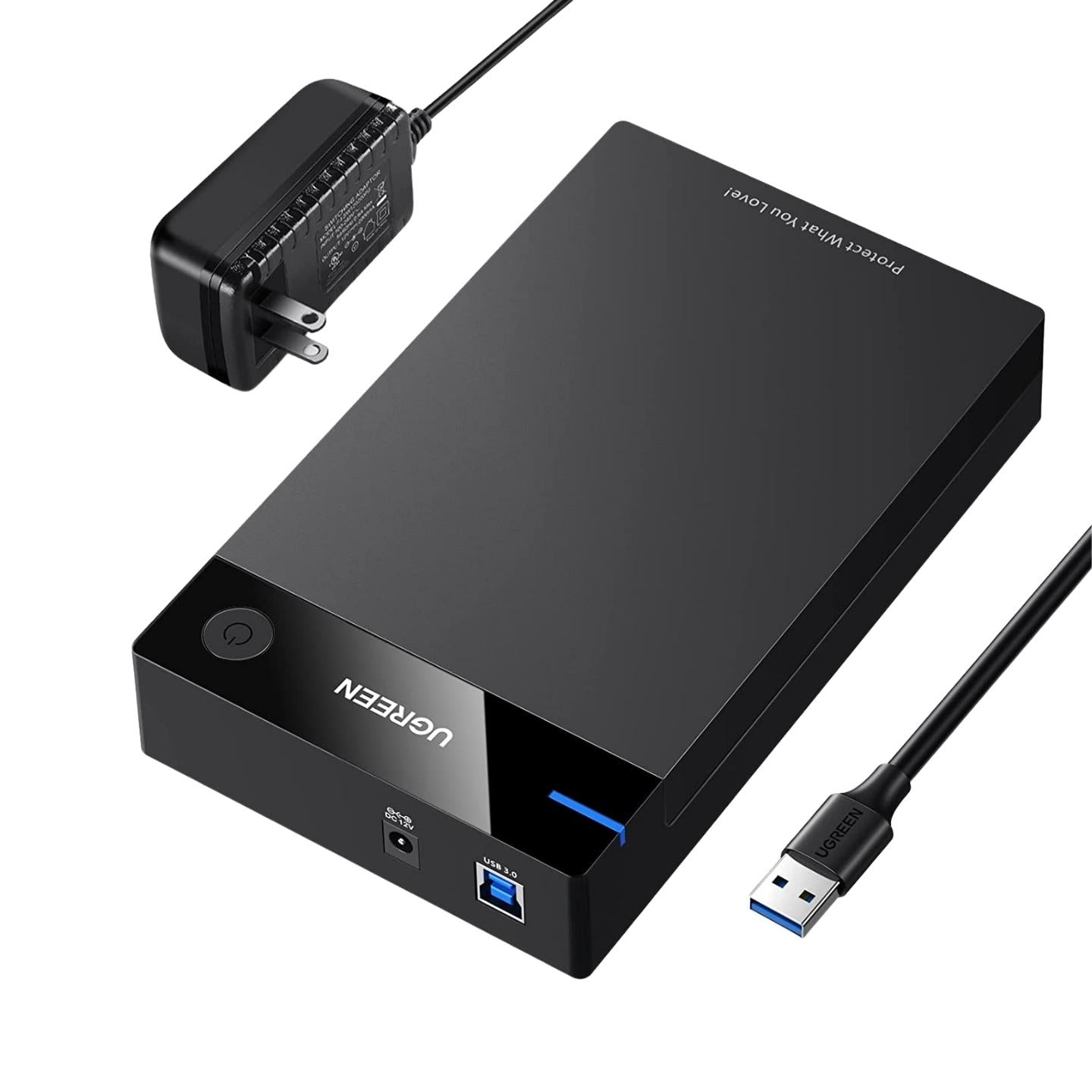
An external hard drive enclosure is a protective case. It houses an internal hard drive. The main purpose is to allow external connectivity. You can connect the enclosure to computers or devices. This helps in accessing the stored data. The enclosure also protects the drive from dust and damage.
Common Uses
Many users find these enclosures useful. They are often used for data backup. This ensures important files are safe. Some use them to expand storage capacity. Gamers use them for storing large game files. Photographers store their high-resolution images. They are also a good choice for transporting data securely. Many professionals rely on them for work purposes.
Types Of Enclosures
An external hard drive enclosure is a protective case that houses a hard drive. It connects the drive to a computer via USB or other interfaces, allowing easy data access and transfer. Enclosures enhance portability and safeguard the drive from physical damage.
When selecting an external hard drive enclosure, understanding the types available can make a huge difference in performance and durability. Different enclosures cater to various needs, from robust material choices to sleek design preferences. Whether you’re safeguarding crucial data or enhancing your workstation aesthetics, finding the right enclosure is key.
Material Options
The material of your enclosure plays a crucial role in protection and heat dissipation. Aluminum enclosures are popular due to their sturdy nature and excellent heat conduction. They not only protect the drive but also keep it cool, enhancing performance and lifespan. Plastic enclosures are often lightweight and budget-friendly. They might not offer the same level of protection as aluminum but are ideal for basic storage needs or for users on the go. Think about how often you transport your drive and choose accordingly. There’s also silicon-cased enclosures designed for rugged use. They provide shock resistance, perfect for those who frequently travel or work in dynamic environments. Are you someone who values portability over protection? Your choice of material can reflect that.
Design Variations
Design can affect both functionality and aesthetics. Docking station designs allow easy swapping of drives, perfect for those who need quick access to multiple drives. They often come with additional ports, enhancing connectivity. Slimline enclosures are sleek and minimalistic, often resembling a modern smartphone. They’re perfect for those who prioritize style and portability. If your workspace is limited, a slim design can be a game-changer. Fan-equipped enclosures provide active cooling for heavy-duty users. They might be bulkier, but the added cooling can prevent overheating during prolonged use. Consider if your tasks require long hours of data transfer—active cooling could save your drive. Choosing the right external hard drive enclosure involves balancing protection, functionality, and style. Which of these factors is most important to you? Your decision should enhance not only your data safety but also your day-to-day productivity.
Compatibility Considerations
When choosing an external hard drive enclosure, compatibility is a key factor to ensure smooth operation and maximum efficiency. You want to be sure that the enclosure you select will work seamlessly with your hard drive and connect effortlessly to your device. Making the right choice can save you from future headaches and wasted time.
Hard Drive Formats
Understanding the format of your hard drive is crucial. Hard drives typically come in two sizes: 2.5-inch and 3.5-inch. The 2.5-inch drives are usually found in laptops, while the 3.5-inch drives are common in desktops.
Before purchasing an enclosure, check which size your drive is. If you’re like me and tend to mix up your tech purchases, this step can save you a trip back to the store. An enclosure that fits a 2.5-inch drive won’t accommodate a 3.5-inch drive. Imagine the frustration of realizing your new gadget is a mismatch!
Interface Types
The interface type of the enclosure determines how the hard drive connects to your computer. The most common interfaces include USB, eSATA, and Thunderbolt. Each offers different speeds and compatibility levels.
If you are using older hardware, ensure that the enclosure supports USB 2.0. However, for faster data transfer, USB 3.0 or even USB-C is preferable. I learned this the hard way when transferring large files took forever because I opted for a lower-speed interface.
Take a moment to consider your device’s ports. Is it equipped with the latest Thunderbolt connections? Choosing an enclosure that aligns with your device’s interface can significantly boost your efficiency.
Have you ever been caught in a situation where you couldn’t connect your external hard drive because of mismatched interfaces? Share your stories in the comments below!
Credit: jgsuperstore.com
Installation Process
The installation process of an external hard drive enclosure might seem challenging. But with the right tools and instructions, it becomes simple. This guide will help you install your enclosure efficiently.
Required Tools
Gather necessary tools to start the installation. You will need a screwdriver. It’s crucial for opening the enclosure. Also, have your external hard drive ready. Make sure it’s compatible with the enclosure. A soft cloth is useful. It keeps components safe from scratches.
Step-by-step Guide
Begin by placing the enclosure on a flat surface. This ensures stability during installation. Open the enclosure using the screwdriver. Remove any screws carefully. Place them aside to avoid losing them.
Insert your hard drive into the enclosure. Align it with the connectors properly. This step is essential for functionality. Secure the drive inside with screws. Ensure it’s tightly fitted to avoid damage.
Close the enclosure and tighten the screws. Make sure everything is locked in place. Connect the enclosure to your computer using the provided cable. Check the connection for stability.
Turn on your computer. Wait for the system to recognize the external hard drive. This might take a few moments. Once recognized, you can start using your new external storage.
Benefits Of Using Enclosures
External hard drive enclosures provide several key benefits. They transform internal drives into portable storage. They also enhance data security and offer a practical storage solution. By using an enclosure, users can safeguard their data effectively. These enclosures are ideal for both personal and professional use.
Portability
External hard drive enclosures make data transport simple. They allow users to carry large files easily. The compact design fits into bags or pockets. This feature is perfect for those needing data on the go. It suits travelers, students, and business professionals alike.
Data Security
Data security is crucial in today’s digital age. Enclosures protect your hard drive from physical damage. They also shield it from dust and moisture. This protection ensures your data remains intact. Enclosures often include locking mechanisms too. This adds an extra layer of security for sensitive data.

Credit: en.wikipedia.org
Potential Drawbacks
External hard drive enclosures offer flexibility and convenience. Yet, they come with certain drawbacks. Knowing these can help make an informed choice.
Performance Limitations
External enclosures might slow down data transfer speeds. Internal drives often perform faster. The connection type affects speed. USB connections may limit data transfer rates. Thunderbolt or eSATA connections are faster. Choose wisely based on your needs.
Durability Concerns
Enclosures protect hard drives but are not indestructible. They can be prone to wear and tear. Constant movement may harm the drive inside. A drop could damage both the drive and enclosure. Some enclosures lack adequate cooling. Overheating can shorten the hard drive’s life. Ensuring a stable and cool environment is crucial.
Choosing The Right Enclosure
Choosing the right external hard drive enclosure ensures your data stays safe. Many factors influence this decision. Budget and features are key considerations. Understanding these elements helps in making an informed choice.
Budget Considerations
Budget impacts the quality of the enclosure you can afford. Low-cost options may lack durability. High-end models offer better protection and reliability. Balance your budget with your storage needs. Consider long-term benefits over short-term savings.
Feature Preferences
Different enclosures offer various features. Some provide faster data transfer speeds. Others offer enhanced cooling systems. Consider the type of hard drive you have. Match the enclosure’s features with your drive’s requirements. USB compatibility is also important.
Look for enclosures with easy installation. Avoid complex setups if you prefer simplicity. Choose models with LED indicators for status updates. Some enclosures provide extra security features. These include encryption support for protecting sensitive data.

Credit: www.amazon.com
Maintenance Tips
An external hard drive enclosure houses a hard drive, allowing it to connect to computers via USB or other ports. Ensuring proper ventilation and regular dust cleaning helps maintain optimal performance and prolongs the device’s lifespan.
Maintaining your external hard drive enclosure is crucial for ensuring its longevity and optimal performance. Regular upkeep not only keeps your data safe but also helps the device function efficiently. By following a few simple tips, you can keep your enclosure in top shape and avoid potential issues. Let’s dive into some practical maintenance advice.
Regular Cleaning
Dust can be a silent killer for electronics. A dusty external hard drive enclosure can overheat or perform poorly. Make it a habit to clean your enclosure regularly. Use a soft, dry cloth to wipe the surface gently. Avoid using water or any liquid cleaner. If there are hard-to-reach areas, a small brush or a can of compressed air can be very effective. Once, my enclosure started overheating due to accumulated dust. A quick clean-up saved me from potential data loss. Isn’t it worth spending a few minutes on regular cleaning to avoid such risks?
Avoiding Overheating
Overheating is a common issue that can damage your enclosure and the hard drive inside. Position your enclosure in a well-ventilated area, away from direct sunlight and heat sources. Check if your enclosure has built-in fans or ventilation slots. Ensure they are unobstructed for proper airflow. If your enclosure feels warm to the touch, consider giving it a break. Once, I placed my enclosure on a soft surface, blocking the airflow. It got hot, and I almost lost my data. Since then, I always ensure it’s on a hard, flat surface. Have you checked where you place your enclosure? It might be time for a quick assessment. By following these simple maintenance tips, you can extend the life of your external hard drive enclosure and keep your data safe.
Frequently Asked Questions
What Does An External Hard Drive Enclosure Do?
An external hard drive enclosure converts an internal hard drive into an external one. It provides protection and allows data access via USB or other connections. This device enables easy file transfer and backup without opening your computer. Enclosures support various drive sizes and types, enhancing storage flexibility.
How To Use An External Hard Drive Enclosure?
Install the hard drive into the enclosure. Connect the enclosure to your computer via USB. Your computer should recognize the drive. Access files through your file explorer. Ensure safe removal before disconnecting.
How Do I Know What Hard Drive Enclosure I Need?
Identify your hard drive’s type and size first. Check compatibility with enclosure interface like SATA or IDE. Match enclosure size, 2. 5 or 3. 5 inches. Ensure USB or Thunderbolt connection suits your needs. Read reviews for reliability and ease of use.
What Is The Difference Between A Hard Drive Dock And An Enclosure?
A hard drive dock connects multiple drives externally for easy swapping. An enclosure houses a single drive, offering protection and portability. Both connect via USB or other ports, but docks facilitate frequent drive changes, while enclosures provide a more permanent, secure solution for individual drives.
Conclusion
Understanding external hard drive enclosures can simplify your digital storage. These devices protect your hard drives and enhance their performance. They provide flexibility, letting you connect drives to different computers easily. Choosing the right enclosure depends on your specific needs.
Consider size, compatibility, and connection type. Most enclosures are easy to install and use. They offer a great solution for expanding your storage. Remember, a good enclosure should keep your data safe. Explore options to find the best fit for you.
Boost your storage and keep your files secure with an external hard drive enclosure.