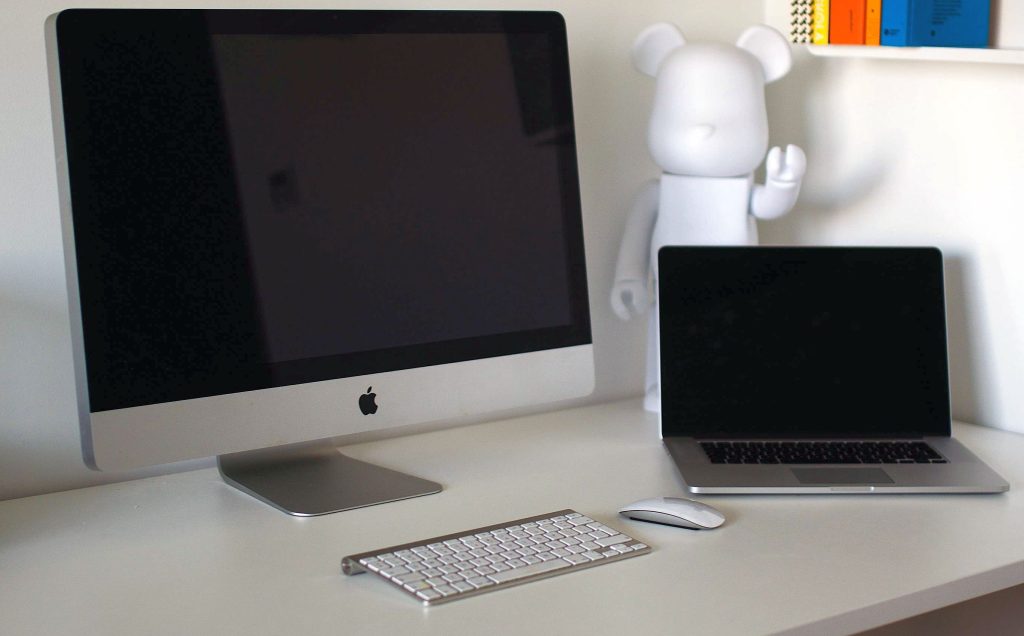
Are you curious about Apple’s sleek and powerful desktop computers? If you’ve ever wondered what they are called or why they stand out in the tech world, you’re not alone.
Many people are intrigued by these devices but may not know exactly what to call them. We’ll demystify the name of Apple’s renowned desktop computers and explore what makes them so unique. By the end, you’ll not only know the name but also understand why owning one could be a game-changer for your digital life.
So, if you’re ready to discover more, keep reading to find out everything you need to know about Apple’s desktop marvels.
Apple Desktop Computer Naming
Apple has a unique naming convention for its desktop computers. The names reflect innovation and style. They are known for their sleek designs and powerful performance.
What Is An Apple Desktop Computer Called?
Apple’s desktop computers are branded under the “iMac” name. iMac is synonymous with quality and elegance. This name has become iconic in the tech world.
Why The Name “imac”?
The “i” in iMac stands for “internet”. It highlights the computer’s internet capabilities. “Mac” is short for Macintosh, Apple’s original computer line.
Variations In The Imac Lineup
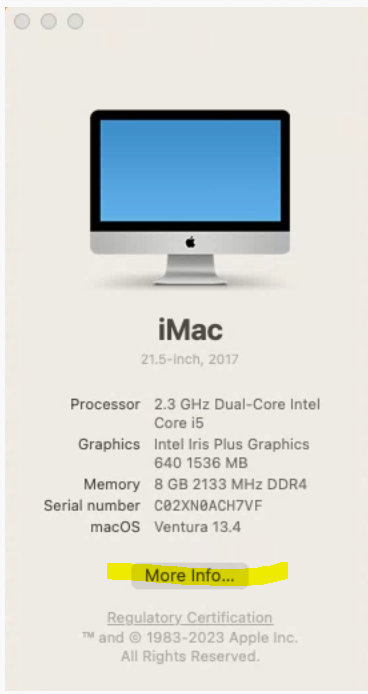
iMacs come in different sizes and specifications. They range from entry-level to high-end models. Each model caters to different user needs and preferences.
Other Apple Desktop Models
Apple also offers the Mac Pro and Mac Mini. Mac Pro is designed for professionals needing high performance. Mac Mini is compact and affordable, perfect for small spaces.
Consistent Branding Across Devices
Apple maintains consistency in its product naming. This strategy strengthens brand recognition. Customers easily identify and trust Apple products.
Imac History
The Apple desktop computer is called an iMac. First launched in 1998, iMac changed the computer world. Its design combined monitor and computer into one sleek unit.
The iMac has been a cornerstone in Apple’s lineup of desktop computers, shaping the way we think about personal computing. Its journey from a quirky newcomer to a sleek powerhouse is a story of innovation and change. Whether you’re a tech enthusiast or just curious, understanding the iMac’s history provides insight into why it remains a popular choice today.
Origins Of Imac
The iMac was introduced to the world in 1998. Steve Jobs, Apple’s visionary co-founder, returned to the company and aimed to revitalize its product line. The first iMac, with its translucent, colorful design, broke away from the traditional beige boxes of the time. This bold design choice was more than just aesthetic. It represented a shift in thinking about how computers could look and feel. The iMac G3 was not just a computer; it was a statement piece for your home or office. Do you remember seeing one for the first time? It was hard to ignore.
Evolution Over Time
Since its debut, the iMac has evolved significantly. Apple has continually pushed the boundaries of design and technology. The transition from CRT monitors to flat LCD screens marked a significant change, making desktops slimmer and more space-efficient. In 2009, Apple introduced the unibody aluminum design, which added durability and a modern look. Later versions brought Retina displays, giving users stunning visuals with vibrant colors and sharp details. If you’ve ever worked on a Retina display, you know how it enhances every task, from graphic design to web browsing. The iMac has also seen internal upgrades. Faster processors and improved graphics have made it a favorite for creative professionals. With each iteration, Apple has focused on providing a seamless and powerful user experience. Have you noticed how each new model gets faster and more efficient, allowing you to do more in less time? The iMac’s history is a testament to Apple’s commitment to innovation. It shows how a desktop computer can be more than just a tool—it can be an integral part of your lifestyle. As you think about your next computer, consider what you need from it. Could the iMac be your perfect match?
Design Features
Apple desktop computers, commonly known as iMacs, are celebrated for their distinctive design features. These elements not only appeal to the eye but also enhance functionality. Let’s dive into what makes the design of an iMac stand out.
Aesthetics And Build
The iMac is a testament to Apple’s commitment to sleek, modern design. Imagine walking into a room and seeing an iMac on the desk; it’s like spotting a piece of art. The slim profile and minimalist look instantly capture attention. The aluminum casing provides durability while keeping the weight manageable.
Apple consistently aims for harmony between form and function. The seamless integration of components ensures that your workspace remains clutter-free. You get a tidy setup without compromising on performance. Think about how a clean workspace can boost your productivity.
Display Technology
One of the standout features of an iMac is its display. Apple integrates cutting-edge technology that makes images and videos look almost lifelike. The Retina display offers high resolution, ensuring that you see every detail clearly. Colors are vibrant, making creative tasks more enjoyable.
Have you ever wondered how display quality impacts your daily computer use? With iMacs, the anti-reflective coating minimizes glare, reducing eye strain. This means you can work longer without discomfort. Imagine editing photos or watching movies with a crisp, clear view, uninterrupted by reflections.
Apple’s innovation in display technology doesn’t just enhance visuals; it enriches your entire experience. Whether you’re a designer, a gamer, or simply browsing the web, the screen quality can elevate your work and play. How much does screen quality matter to you?
Credit: support.wcsu.edu
Performance And Hardware
Apple desktop computers are known for their strong performance. They offer efficient hardware that meets the needs of different users. Whether for gaming, designing, or everyday tasks, these desktops perform well. Explore their processor options and graphics capabilities below.
Processor Options
Apple desktops come with different processor choices. The latest models feature Apple’s own M-series chips. These processors offer fast performance and energy efficiency. For users who need more power, Intel processors are available. They provide reliable speed and multitasking ability. Choose a processor based on your computing needs.
Graphics Capabilities
Graphics are essential for high-quality visuals. Apple desktops include integrated graphics that handle basic tasks efficiently. For demanding applications, dedicated GPUs are available. These enhance video editing and gaming experiences. Users can enjoy smooth and vibrant displays. Select the right graphics option for your workload.
Software Ecosystem
Apple’s desktop computer is called the iMac. This sleek machine combines powerful performance with a stylish design. Perfect for both personal and professional use, the iMac offers a seamless user experience.
The software ecosystem of an Apple desktop computer, commonly known as the Mac, is a key component of its allure and functionality. This ecosystem is designed to offer seamless integration and a rich variety of applications, making it an appealing choice for both personal and professional use. Whether you’re a creative professional, a student, or someone who simply enjoys a smooth computing experience, understanding the software environment of a Mac can significantly enhance your productivity.
Macos Integration
The macOS operating system is the heart of every Apple desktop. It is designed to work harmoniously with Apple’s hardware, providing a smooth and efficient user experience. One of the standout features is the continuity across Apple devices. You can start a task on your iPhone and pick up right where you left off on your Mac. This integration extends to services like iCloud, which ensures your documents, photos, and other files are always accessible. The ability to use your iPad as a second screen with Sidecar is another example of how macOS enhances your workflow. Have you ever used your Apple Watch to unlock your Mac? It’s these little conveniences that make the ecosystem feel complete and user-friendly.
App Compatibility
The Mac’s software ecosystem boasts a vast library of apps tailored for various needs. The Mac App Store is filled with applications for productivity, creativity, and entertainment. Many professional-grade software programs like Adobe Creative Cloud and Microsoft Office are fully compatible and optimized for macOS. Moreover, the introduction of Apple Silicon chips has broadened app compatibility. Now, you can run iPhone and iPad apps on your Mac, which expands your software options significantly. As a user, have you ever thought about how this ability can simplify your life by keeping all your favorite apps in one place? Additionally, macOS supports a wide range of open-source applications, providing flexibility for developers and tech enthusiasts. This adaptability ensures that whether you’re coding, designing, or writing, there’s an app for your every need. The software ecosystem of an Apple desktop computer is more than just a collection of applications; it’s a well-integrated environment that enhances productivity and user experience. By taking full advantage of macOS integration and app compatibility, you can tailor your Mac to fit your unique lifestyle and work habits. Have you explored the full potential of your Mac’s software ecosystem yet?

Credit: en.wikipedia.org
Imac Models
The iMac models are well-known desktop computers from Apple. They offer sleek designs and strong performance. Many users appreciate their seamless integration with Apple’s ecosystem. The iMac is perfect for creative professionals, students, and anyone needing a reliable computer. Let’s explore the different iMac models available today.
Standard Vs. Pro
The standard iMac suits everyday tasks and light creative work. It has a powerful processor and clear display. This model is ideal for general use, web browsing, and office tasks.
The iMac Pro is built for heavy-duty tasks. It boasts faster processors and advanced graphics. Creative professionals benefit from its enhanced capabilities. The iMac Pro handles video editing and 3D rendering with ease.
Size Variations
iMac models come in various sizes to fit different needs. The 24-inch model offers a compact design. It is ideal for small spaces and home offices. This size is perfect for users who need a simple yet powerful machine.
The 27-inch model provides a larger screen. It is great for detailed work and multitasking. Users who work with multiple applications at once find this size beneficial. The bigger display makes creative tasks more enjoyable.
User Experience
Apple desktop computers, known as iMacs, offer a distinctive user experience that stands out in the tech world. They are renowned for their sleek design and seamless integration of hardware and software. Whether you’re a tech enthusiast or a casual user, there’s something about the iMac that draws you in.
Ease Of Use
One of the first things you notice about an iMac is how easy it is to set up. You don’t need to be a tech genius to get started. Simply plug it in, turn it on, and you’re greeted with a user-friendly interface.
Navigating through its features feels intuitive. The macOS operating system is designed to be straightforward. You can quickly find apps, manage files, and customize settings with just a few clicks.
Ever wondered why so many people love their iMac? It’s because they don’t have to struggle with complicated setups or confusing menus. Everything is simplified, making it accessible for everyone.
Customization Options
While iMacs are easy to use, they also offer customization options that cater to your personal preferences. You can tweak the desktop background, organize files in unique ways, and adjust system settings to suit your needs.
For those who love personalization, the App Store is a treasure trove. You can download apps that enhance productivity, creativity, or just add fun to your day. Imagine transforming your iMac into a powerhouse of tools tailored specifically for you.
But here’s the real question: How do you make your iMac truly yours? Dive into the settings and explore the myriad of options that let you shape your user experience. The possibilities are almost endless.
Buying Guide
Apple desktop computers are known for their sleek design and powerful performance. They offer a range of options to suit different needs and preferences. This buying guide will help you find the right Apple desktop computer. It covers important aspects like model selection and pricing.
Choosing The Right Model
Apple offers several desktop models, each with unique features. The iMac is popular for everyday use and creative tasks. It combines a sharp display with a robust processor. The Mac Mini is compact and versatile, ideal for small spaces. If you need high-performance graphics, consider the iMac Pro. It handles demanding applications with ease.
Assess your specific needs before choosing a model. Consider tasks like photo editing, gaming, or general use. Each model caters to different requirements. Understanding your needs will guide your decision. Choose a model that aligns with your tasks and lifestyle.
Price Considerations
Apple desktop computers vary in price. The iMac is moderately priced, offering good value. The Mac Mini is the most affordable option. It provides essential features at a lower cost. The iMac Pro is the premium choice, reflecting its advanced capabilities.
Set a budget before exploring options. Compare features and prices across models. This helps in making an informed choice. Remember that additional features can affect the total cost. Evaluate your budget against the features you need.
Future Of Imac
The future of the iMac is exciting and promising. Apple’s desktop computers have always been ahead in technology. They combine sleek design with powerful performance. As technology advances, the iMac evolves too.
Upcoming Innovations
The iMac is expected to feature advanced processors. These will increase speed and efficiency. Apple might introduce more customization options. This means users can tailor their iMac to their needs. New display technologies could enhance visual experiences. Expect brighter screens and more vivid colors.
There are rumors of improved connectivity features. This could include faster Wi-Fi and Bluetooth capabilities. Security upgrades are likely. Enhanced biometric systems might protect user data better. The iMac may also integrate more with other Apple devices. This would create a seamless ecosystem for users.
Market Trends
Market trends show a rising demand for desktop computers. Many users prefer desktops for their reliability. The iMac is popular among professionals. Its design appeals to creative industries like graphic design. The iMac’s integration with software like Final Cut Pro is a selling point.
Consumers are looking for sustainable technology. Apple is committed to using recycled materials. This aligns with market desires for eco-friendly products. The iMac’s longevity is another trend. Users want products that last longer. Apple aims to meet this demand with durable iMacs.

Credit: www.apple.com
Frequently Asked Questions
What Is A Desktop Apple Computer Called?
A desktop Apple computer is called an iMac. It features an all-in-one design with a built-in display. The Mac Pro is another powerful desktop option for professionals. Both offer excellent performance and sleek design, catering to different user needs.
What Is The Apple Version Of Desktop?
Apple’s desktop version is macOS, designed for Mac computers. It offers a sleek interface and powerful performance. With seamless integration across Apple devices, macOS supports productivity and creativity, featuring apps like Safari, Photos, and Mail. Regular updates ensure security and enhance functionality, making it a preferred choice for many users.
What Do We Call An Apple Computer?
An Apple computer is called a Mac. Short for Macintosh, Mac computers are known for their sleek design and user-friendly interface. Popular models include the MacBook, iMac, and Mac Mini. Macs are widely used for creative work, education, and personal use.
What Is The Difference Between A Desktop Computer And A Mac Computer?
A desktop computer typically runs Windows, while a Mac computer uses macOS. Macs are known for sleek design and user-friendly interface. Windows desktops offer more hardware customization. Mac computers often have higher price points. Macs excel in graphic design; desktops are favored for gaming and business applications.
Conclusion
Apple desktop computers are known as iMacs. Recognized for sleek design. Known for powerful performance. Loved for user-friendly interface. IMacs feature high-resolution screens. Perfect for creative tasks and everyday use. They offer reliable computing experience. Ideal for personal and professional needs.
IMacs blend style with functionality. Choose iMacs for seamless Apple experience. Enjoy quality and innovation in one package. Exploring options? Consider iMacs for your next desktop. They stand out in the tech world. A trusted choice for many users. Discover the simplicity and elegance of iMacs today.