
Have you ever found yourself squinting at your computer screen or feeling overwhelmed by its sheer size? Choosing the right monitor size can significantly impact your comfort and productivity.
Whether you’re setting up a home office, enhancing your gaming experience, or simply upgrading your tech, understanding the average size of a computer monitor is crucial. This article will guide you through the various sizes available, helping you make an informed decision tailored to your needs.
Dive in and discover the perfect fit for your desk and your eyes.
Credit: www.viewsonic.com
Common Monitor Sizes
Common monitor sizes range from 21 to 27 inches. Most users prefer 24 inches for a balanced viewing experience. This size is ideal for work, gaming, and entertainment.
Understanding the average size of a computer monitor can be crucial, especially if you’re setting up a new workspace or upgrading your current setup. Whether you’re a gamer, a graphic designer, or someone who simply enjoys streaming movies on a larger screen, the size of your monitor can significantly impact your experience. Let’s dive into common monitor sizes and explore what might work best for your needs.
24-inch Monitors
A 24-inch monitor is often the go-to choice for many users. These monitors are compact, making them ideal for smaller desks or workspaces. Despite their size, they offer a decent screen real estate for multitasking and general use. If you’ve ever worked in an office, chances are you’ve used a 24-inch monitor. They’re ubiquitous in professional settings due to their balance between size and usability.
27-inch Monitors
Moving up, the 27-inch monitor is popular among gamers and professionals. The larger screen provides more space for split-screen tasks and enhances your gaming or movie-watching experience with sharper details. Have you ever struggled with fitting multiple windows on your screen? A 27-inch monitor can alleviate that issue, offering ample space without overwhelming your desk.
32-inch Monitors
For those who crave an immersive experience, 32-inch monitors are a fantastic choice. These are often found in graphic design studios and gaming setups, where precision and detail are critical. Imagine watching your favorite movie on a 32-inch monitor. The screen envelops you, making every scene more engaging.
Ultrawide Monitors
Ultrawide monitors, often starting at 34 inches, are perfect for multitaskers. They replace the need for dual monitors, offering a seamless, expansive view. Consider the convenience of having multiple spreadsheets open side by side without the hassle of multiple monitors. Ultrawide screens simplify your workflow.
Choosing The Right Size For You
Selecting the right monitor size isn’t just about numbers. It’s about how you use your computer and the space available to you. Do you prefer a minimal setup, or do you need a large screen for detailed work? Reflect on your daily tasks and choose a size that enhances your productivity and enjoyment. Remember, bigger isn’t always better. It’s about finding the perfect fit for your needs. What size aligns with your lifestyle and work habits?

Credit: www.hp.com
Popular Screen Dimensions
Choosing the right computer monitor size is crucial. It affects your work and entertainment experience. Popular screen sizes range from 21 to 32 inches. Many people choose a 24-inch monitor for its balance. It provides a good viewing experience without taking up too much space.
Larger monitors, like 27 or 32 inches, offer more screen real estate. This is great for multitasking or gaming. Smaller sizes, like 21 inches, are ideal for tight spaces. Each size has its advantages depending on your needs.
Aspect Ratio Variations
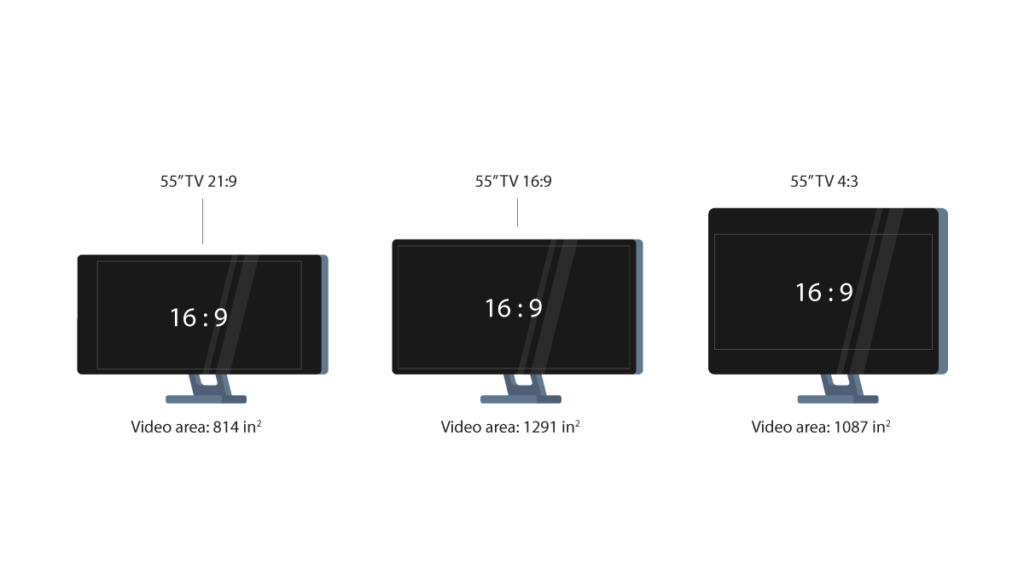
The aspect ratio of a monitor affects its shape. The most common ratio is 16:9. This is used in many widescreen monitors today. It provides a good balance for movies and games. Some monitors have a 21:9 aspect ratio. These ultrawide screens are excellent for multitasking. They give more horizontal space.
Older monitors may have a 4:3 ratio. This is more square-shaped. It is less common now but still used in some places.
Resolution Impact
Resolution defines how clear the screen is. Higher resolution means more detail. Common resolutions include Full HD (1920×1080). This is suitable for most tasks. For sharper images, choose Quad HD (2560×1440). It works well for large screens. 4K resolution (3840×2160) offers incredible detail. It is perfect for professional work and high-end gaming.
Remember, higher resolution requires a more powerful computer. It ensures smooth performance.
Influence Of Usage On Size
The size of a computer monitor greatly impacts the user experience. Different tasks demand different screen sizes for optimal performance. Understanding the influence of usage on size helps in choosing the right monitor. Whether for office work, gaming, or graphic design, each purpose has unique requirements.
Office Work Requirements
Office tasks often need clarity and focus. Monitors between 22 and 27 inches are common for office work. This size allows for easy multitasking and document handling. A larger screen can reduce eye strain during long hours.
Gaming Preferences
Gamers often prefer larger screens for immersive experiences. Monitors ranging from 24 to 32 inches are popular among gamers. A bigger screen enhances graphics and details, providing a more engaging play. The larger size also supports higher resolutions for better visuals.
Graphic Design Needs
Graphic designers require precision and color accuracy. Monitors over 27 inches are ideal for design work. This size allows for detailed editing and viewing of large files. A bigger screen helps in maintaining the integrity of complex designs.
Credit: www.pcmatic.com
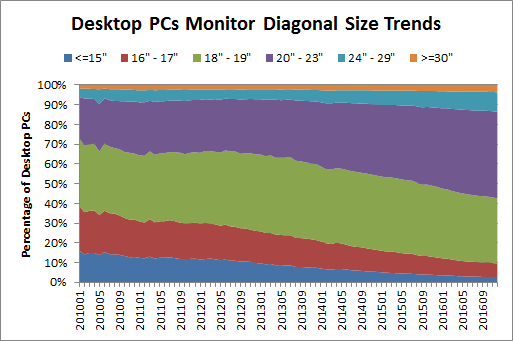
Trends In Monitor Sizes
The world of computer monitors is constantly evolving, and keeping up with trends can be quite exciting. Monitor sizes today vary widely, catering to different needs and preferences. Whether you’re a gamer seeking an immersive experience or someone looking for a compact display for a cozy room, there’s something for everyone. Let’s explore some fascinating trends in monitor sizes.
Rise Of Ultra-wide Screens
Ultra-wide screens are making waves among tech enthusiasts. These monitors provide expansive views, perfect for multitaskers and gamers. Imagine playing your favorite game with a panoramic view or working with multiple windows open side by side. It’s almost like having two monitors in one! This trend is gaining popularity, especially among those who crave more screen real estate without the hassle of a dual-monitor setup.
Ultra-wide screens can range from 29 to 49 inches, with aspect ratios like 21:9. They offer a seamless experience, reducing the need for constant window switching. Have you tried an ultra-wide monitor yet? It might just change how you work or play.
Compact Options For Small Spaces
Not everyone has the luxury of space for a giant monitor. Compact monitors are perfect for small apartments or home offices where space is at a premium. These monitors, usually ranging from 19 to 24 inches, offer functionality without overwhelming your desk.
Compact monitors are also great for students or anyone who needs a straightforward display for browsing and basic tasks. They fit snugly in tight spaces, making them ideal for minimalist setups. Have you ever found yourself rearranging furniture just to fit your monitor? A compact option might be the solution you didn’t know you needed.
Trends in monitor sizes reflect the diverse needs of users today. Whether you’re seeking something ultra-wide for immersive experiences or compact for cozy corners, there’s a monitor out there for you. What size fits your lifestyle best?
Choosing The Right Size
Choosing the right size for your computer monitor can enhance your experience. The size impacts comfort, productivity, and usage. A suitable monitor size improves work efficiency and reduces strain. Understanding your needs helps in selecting the right monitor size. Let’s look at some factors to consider.
Space Considerations
Space plays a vital role in selecting a monitor size. A large monitor in a small room can feel overwhelming. Measure your desk space before deciding. Consider the distance between you and the monitor. A closer distance may require a smaller screen. Wall-mounted options can save desk space. Ensure your setup accommodates your chosen size comfortably.
Budget Constraints
Budget is crucial in choosing the right monitor size. Larger monitors often cost more. Determine your budget before shopping. Explore different brands and models. You might find a good deal on a suitable size. Remember, a bigger screen doesn’t always mean better quality. Balance size with performance and budget.
Frequently Asked Questions
Is A 27 Inch Monitor Too Big For A Computer?
A 27-inch monitor suits many users, offering ample screen space for multitasking and gaming. It fits most desks comfortably. Consider your workspace size and distance from the screen to ensure optimal viewing experience. This monitor size is popular for both work and entertainment, providing clarity and immersion.
Is 25 Inches Big For A Monitor?
A 25-inch monitor is considered medium-sized. It offers a good balance for gaming, work, and media consumption. It’s larger than a standard laptop screen but smaller than many high-end displays. Perfect for those who need more screen space without taking up too much desk area.
Is A 24-inch A Big Monitor?
A 24-inch monitor is considered medium-sized for most users. It offers a good balance of screen space for tasks like gaming, work, or casual browsing. For larger screen needs, sizes above 27 inches might be preferred. Always assess personal requirements and available space before choosing.
What Is The Size Of A 27 Inch Monitor?
A 27 inch monitor typically measures 27 inches diagonally from corner to corner. The width is around 24 inches, and the height is approximately 13. 5 inches. These dimensions can vary slightly depending on the model and design of the monitor.
Always check the manufacturer’s specifications for precise measurements.
Conclusion
Choosing the right monitor size is essential for comfort. A larger screen enhances productivity and entertainment experiences. Smaller screens fit tight spaces and budget constraints. Consider your desk space and purpose before deciding. Popular sizes range from 24 to 32 inches.
Each size serves different needs and preferences. A well-sized monitor boosts satisfaction and efficiency. Evaluate your tasks and environment for the best choice. Remember, the perfect monitor size varies for everyone. Your ideal monitor supports your daily activities effectively. Make your selection wisely for a better computing experience.